- Nowy
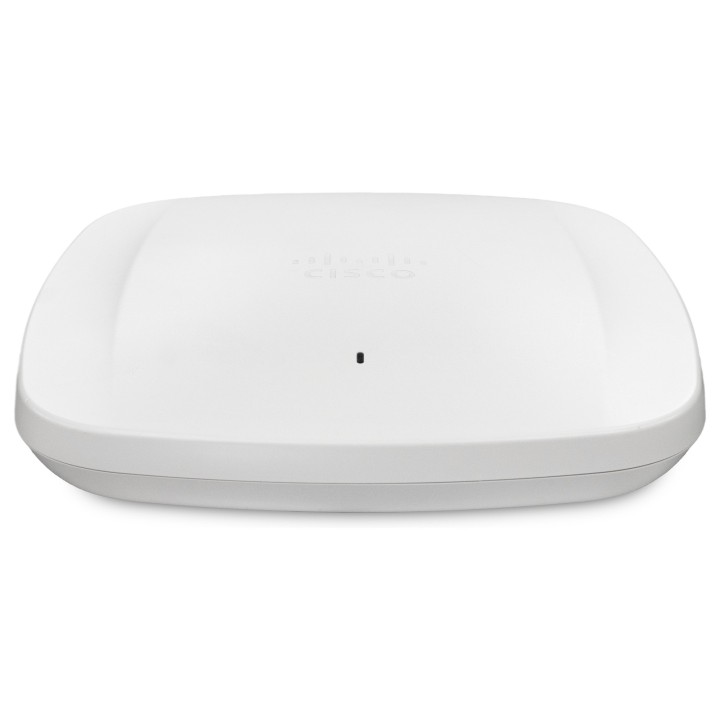
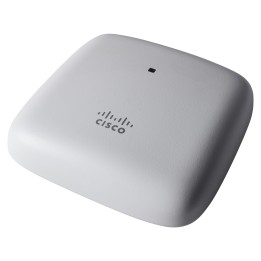
CISCO Catalyst Wireless 9162I AP W6E tri-band 2x2 w/Reg E obrazki
CISCO Catalyst Wireless 9162I AP W6E tri-band 2x2 w/Reg E
PragmaPay dla biznesu
Zapłać za zakupy firmowe później lub w ratach przez Tpay.
Sprawdź, jak działa (otwiera się w nowej karcie)Opis produktu
Cisco Meraki CW9162I. 2.4 GHz. 5 GHz. 6 GHz. Maksymalna szybkość przesyłania danych: 3900 Mbit/s. Szyfrowanie / bezpieczeństwo: EAP-TLS. EAP-TTLS. WEP. WPA. WPA2-Enterprise. WPA2-PSK. WPA3. WPA3-Enterprise. Prędkość transferu danych przez Ethernet LAN: 100.1000.2500 Mbit/s. Kolor produktu: Biały
Specyfikacja
- Opis produktu: Cisco Catalyst 9162I punkt dostępu bezprzewodowego Bluetooth, WiFi 6E zarządzanie w chmurze
- Rodzaj urządzenia: Punkt dostępu bezprzewodowego
- Rodzaj obudowy: Zewnętrzna pokojowa
- RAM: 2 GB
- Pamięć fleszowa: 1 GB
- Protokół komunkacyjny danych: Ethernet, Fast Ethernet, Gigabit Ethernet, IEEE 802.11b, IEEE 802.11a, IEEE 802.11g, IEEE 802.11n, IEEE 802.11ac, 2.5 Gigabit Ethernet, Bluetooth 5.1 LE, IEEE 802.11ax (WiFi 6E)
- Pasmo częstotliwości: 2.4 GHz, 5 GHz, 6 GHz
- Wymagany system operacyjny: Cisco IOS XE 17.9.2, Cisco IOS XE 17.10.1 lub nowsza wersja
- Obsługuje Power Over Ethernet (PoE): UPOE
- Typ ceny: Minimalna wielkość zamówienia 10 jednostek
- Wymiary (szer.głęb.wys.): 20 cm x 20 cm x 4.445 cm
- Waga: 930 g
Szczegóły produktu
- Marka CISCO
- Kod produktu 6610c767620507cf6ebf0c2f
- Dostępność 96 Przedmioty
- EAN13 0889728464208
- MPN CW9162IE
Specyfikacja
- Liczba portów LAN (szt.) 1 szt.
Producent
Producent
Cisco Systems Poland Sp. z o.o.
Domaniewska 39B 02-672 Warszawa POLSKA
E-mail: info-center@cisco.com
Formularz kontaktowy: https://www.cisco.com/c/pl_pl/support/index.html
Telefon: +48 22 572 27 00
Bezpieczeństwo
Informacje o bezpieczeństwie
List of safety warnings for WiFi and Access Point Routers based on the requirements of Regulation (EU) 2023/988 on General Product Safety (GPSR) 1. Risk of electric shock: * Make sure that the device is connected to a working socket with grounding. * Do not touch the plug or cable with wet hands. * Avoid using the device in places with high humidity. 2. Risk of overheating: * Provide adequate ventilation while maintaining at least 5 cm of free space around the device. * Do not block ventilation openings. 3. Fire risk: * Use only original power supplies and accessories recommended by the manufacturer. * Do not leave the device on unattended near flammable materials. 4. Hazards at high temperatures: * Do not expose the device to direct sunlight. * Avoid using the router at temperatures above the recommended range (usually 5-35°C). 5. Risk of damage during cleaning: * Before cleaning, disconnect the device from the power supply and use a soft, slightly damp cloth. * Avoid using strong detergents that can damage the surface of the device. 6. Warnings for children: * Keep power cables out of reach of children. * Make sure that children do not play with the device or accessories that can be dangerous. 7. Regularly check the technical condition of the device: * Check the condition of the device regularly for mechanical damage, cracks or other defects. * Do not use the device if it has visible mechanical damage. 8. Use in humid environments * Avoid using your router in the bathroom, in the rain or in other humid environments 9. Interference with other devices * Using a router near medical devices such as pacemakers can cause electromagnetic interference. * Keep a distance of at least 15 cm between your router and medical devices. 10. Regular maintenance * Failure to regularly clean ports and sockets can lead to damage or failure. * Clean ports and sockets regularly using a dry and clean cloth, avoiding moisture input. 11. Risk of loss of water resistance * Do not immerse in water if it is not waterproof. 12. Electromagnetic interference * Smartwatches can interfere with medical devices such as pacemakers. 13. Small parts: * Components of the device, can be swallowed by children. * Keep your device and its accessories out of reach of children. Do not allow children to use the device themselves without supervision. 14. Risk of battery damage * Improper use, such as overheating or using a non-original charger, can lead to battery damage and, in extreme cases, to battery explosion. * Charge your device at room temperature and use only original accessories. Do not expose your smartwatch to high temperatures. 15. Maintenance and cleaning * Impurities such as sweat or dirt can cause discomfort and damage to materials. * Clean your smartwatch and strap regularly with a soft, damp cloth. Avoid using harsh chemicals.
Routery Wi-Fi i Access Pointy
Ostatnio oglądane
Produkty, które ostatnio zwróciły Twoją uwagę.
- Nowy
- Nowy
- Nowy