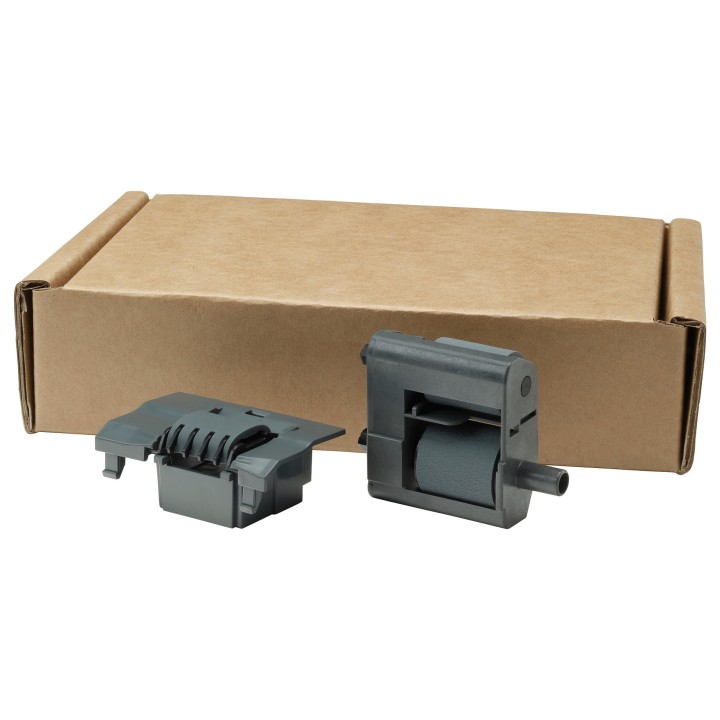
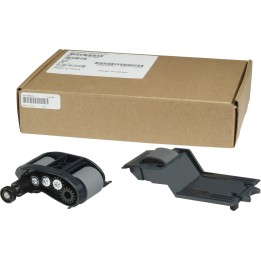
HP ADF ROLLER REPLACEMENT KIT/.

Cena: 148,49 zł
Brutto
Dostępność produktu: Dostępny 4 szt.
Czas dostawy Wysyłka w ciągu 2 dni roboczych
Koszt dostawy Dostawa od 11,99 zł

Raty Pekao

Za zakupy możesz zapłacić na raty przez Tpay.

Oblicz ratę (otwiera się w nowej karcie)

PragmaPay dla biznesu

Zapłać za zakupy firmowe później lub w ratach przez Tpay.

Sprawdź, jak działa (otwiera się w nowej karcie)

Opis produktu

Zestaw rolek podajnika

HP W1B47A ADF Roller Replacement Kit to zestaw wymiennych rolek automatycznego podajnika dokumentów w zgodnych urządzeniach wielofunkcyjnych HP. Służy do konserwacji mechanizmu pobierania dokumentów.

Kompatybilność

Dane produktu wskazują zgodność z serią HP PageWide Managed: P75050dn, P77740dn, P77750zs, P77750z i P77760z.

Identyfikacja

Producent: HP. Kod producenta: W1B47A. Rodzaj części: rolki podajnika ADF. Produkt jest częścią serwisową, a nie kompletnym urządzeniem wielofunkcyjnym.

Specyfikacja

  • Compatibility: HP PageWide Managed P75050dn, P77740dn, MFP P77750zs, MFP P77750z, MFP P77760z
  • Brand compatibility: HP
  • Type: Roller
  • Product colour: Black
  • Device compatibility: Multifunctional
  • HP segment: Business,Enterprise,Home
  • Weight: 40 g
  • Height: 28 mm
  • Depth: 68 mm
  • Width: 90 mm
  • Package weight: 120 g
  • Package height: 50.8 mm
  • Package width: 209.55 mm
  • Package depth: 139.7 mm
  • Pallet dimensions (W x D x H): 1219.2 x 1016 x 2050.03 mm
  • Pallet dimensions (W x D x H) (imperial): 42 x 40 x 80.71 "
  • Pallet weight (imperial): 390.65 lbs
  • Harmonized System (HS) code: 84439990
  • Layers per pallet: 45 pc(s)
  • Master (outer) cases per pallet layer: 39 pc(s)
  • Products per pallet: 1755 pc(s)
  • Pallet gross weight: 177200 g
  • UNSPSC-code: 44103125

Szczegóły produktu

  • Marka HP Inc.
  • Kod produktu 667b69e6606d4e0eab933fea
  • Dostępność 4 Przedmioty
  • EAN13 0190781994114
  • MPN W1B47A

Specyfikacja

  • Kolor Czarny

Producent

Producent

HP Inc Polska Sp. z o.o.

ul. Szturmowa 2a 02-678 Warszawa Polska

E-mail: support@hp.com

Formularz kontaktowy: https://www.hp.com/us-en/contact-hp/contact.html

Telefon: +1 650-857-1501

Osoba odpowiedzialna w UE

HP Inc Polska sp. z o.o

Plac marsz. Józefa Piłsudskiego 1 00-078 Warszawa Polska

E-mail: support@hp.com

Bezpieczeństwo

Informacje o bezpieczeństwie

List of safety warnings for parts and accessories for printers and scanners, computers and electronics based on the requirements of General Product Safety Regulation (GPSR) 2023/988: 1. Risk of electric shock: * Make sure your printer/scanner is connected to a working grounded outlet. * Do not touch the plug or cable with wet hands. Avoid using the device in places with high humidity. 2. Risk of overheating: * Provide adequate ventilation while maintaining at least 5 cm of free space around the device. * Do not block ventilation openings. * Do not use the printer/scanner near heat sources or in a sunny place for extended periods of time. 3. Fire risk: * Use only original chargers and accessories recommended by the manufacturer. * Do not leave the device on unattended near flammable materials. 4. Risk of bodily injury: * Use the device on a stable surface to minimize the risk of falling. * Keep power cables out of reach of children. Make sure that children do not play with the device or accessories that can be dangerous. 5. Hazards at high temperatures: * Do not expose the device to direct sunlight. Avoid using the printer/scanner at temperatures above the recommended range (usually 5-35°C). 6. Risk of damage during cleaning: * Before cleaning, disconnect the device from the power supply and use a soft, slightly damp cloth. Avoid using strong detergents that can damage the surface of the device. 7. Caution when replacing accessories: * Use only the accessories recommended by the manufacturer. * When replacing batteries, follow the manufacturer's instructions and do not expose the battery to high temperatures. 8. Risks associated with battery use: * Avoid damage to the battery by impact or puncture. If the battery overheats or swells, stop using the device immediately. 9. Regular maintenance: * Failure to regularly clean ports and sockets can lead to damage or failure. * Clean ports and sockets regularly using a dry and clean cloth, avoiding moisture input. 10. Effects on eye health: * Long-term staring at the monitor screen when working with a printer/scanner can lead to eye strain * Take regular breaks from the screen to give your eyes a rest. 11. Risk of cuts: * Replacement of carcasses/toners may involve the risk of getting your hands dirty, so use protective gloves. * Beware of sharp edges and elements inside the printer/scanner when replacing parts or cleaning. 12. Choking hazard: * Small items such as end caps can pose a risk to children – keep them out of reach of children. 13. Electromagnetic interference: * Using a printer/scanner near medical devices such as pacemakers can cause electromagnetic interference. * Keep a distance of least 15 cm between the printer/scanner and medical devices. 14. Battery explosion risk: * Damaged or low-quality batteries in accessories may explode during charging or heavy use. * Use only original charging accessories. Avoid exposing accessories to impact and high temperature. 15. Failures: * In case of failure of the AC adapter, you should immediately stop using the equipment until the damaged component is repaired. 16. Workplace safety: * Make sure that you have enough space in the place where you use the equipment to avoid tripping and falling. * Take care of proper lighting to see well what you are doing.

Ładowanie...
Wróć na górę