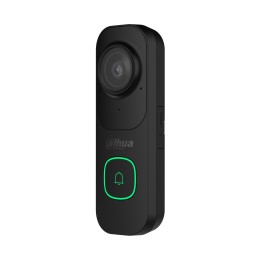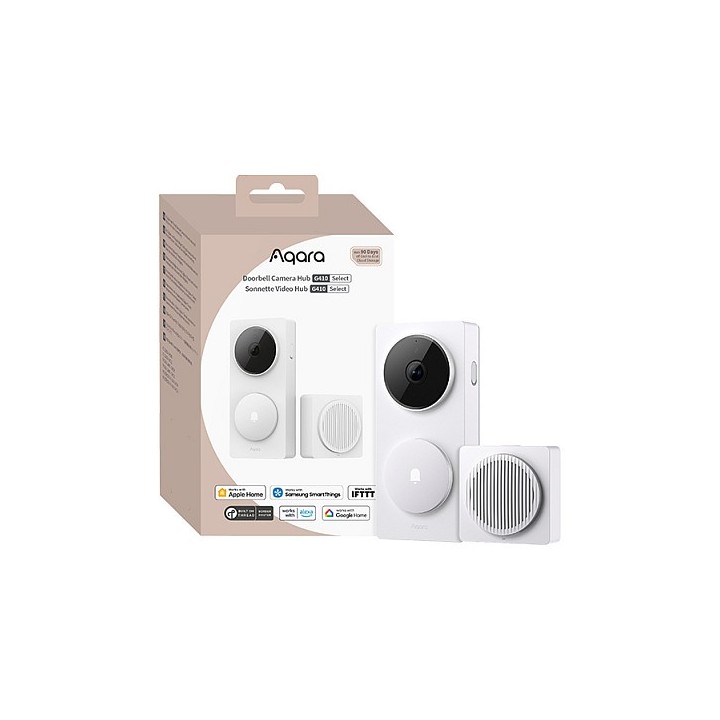
Aqara centrala do dzwonka z kamerą G410 Select White
PragmaPay dla biznesu
Zapłać za zakupy firmowe później lub w ratach przez Tpay.
Sprawdź, jak działa (otwiera się w nowej karcie)Opis produktu
Przeznaczenie
Centrala Aqara do dzwonka z kamerą G410 Select White to urządzenie pełniące rolę centralnego elementu systemu dzwonkowego z kamerą; służy do integracji funkcji dzwonka i kamery w ramach instalacji inteligentnego domu oraz jako punkt połączeniowy między elementami systemu.
Konstrukcja i wariant
Model G410 Select White występuje w białym wykończeniu oznaczonym w nazwie jako Select White.
Produkt jest identyfikowany przez model G410 i markę Aqara, a jego nazwa wskazuje na wersję przeznaczoną do współpracy z instalacjami dzwonkowymi wyposażonymi w kamerę.
Szczegóły produktu
- Marka AQARA
- Kod produktu 69bd56c450479989057def02
- Dostępność 30 Przedmioty
- EAN13 6975833358397
- MPN CH-C09D-W
Producent
Producent
Lumi United Technology Co., Ltd.
Room 801-804, Building 1, Chongwen Park, Nanshan iPark, No. 3370 Liuxian Avenue, Fuguang Community, Taoyuan Residential District 518000 Nanshan District, Shenzhen Chiny
E-mail: support@aqara.com
Osoba odpowiedzialna w UE
eVatmaster Consulting GmbH
Raiffeisenstraße 2 B11 63110 Rodgau Niemcy
E-mail: contact@evatmaster.com
Bezpieczeństwo
Informacje o bezpieczeństwie
List of safety warnings for intercoms and video intercoms based on the requirements of Regulation (EU) 2023/988 on general product safety (GPSR): 1. Risk of electric shock: * Make sure that the electrical system is made by a qualified electrician in accordance with applicable safety standards. * Do not touch electrical wires with wet hands. * Disconnect the power supply before proceeding with any maintenance or repair work. 2. Child Hazard: * Make sure the wires are protected from children's access to avoid the risk of suffocation or paralysis. * Do not allow children to play with intercom or video intercom elements. 3. Compatibility with other devices: * Check whether the intercom or video intercom is compatible with other devices in your home, e.g. with alarm systems. 4. Outdoor installation: * If the device is intended for outdoor installation, make sure it is weather resistant and adequately protected against moisture. 5. Maintenance and cleaning: * Clean the machine regularly using a soft, dry cloth. * Do not use aggressive cleaning agents that can damage the surface of the device. 6. Batteries: * If your device is running on batteries, use only the batteries recommended by the manufacturer. * Replace batteries according to the instructions, paying attention to the correct polarity. * Return used batteries to electronic waste collection points. 7. Installation: * Make sure the device is securely mounted to avoid falling and potential injury. * For assembly use only the mounting hardware provided by the manufacturer or recommended by him. 8. Failures and repairs: * In case of failure or damage, do not try to repair the device yourself. Contact a technical service or a qualified specialist. 9. Disposal: * After use, the device must be disposed of in accordance with local regulations on electronic waste. Do not throw the device in a regular trash can. 10. Data protection: * If the video intercom captures an image, please inform the visitors and make sure that you comply with the data protection regulations (GDPR).