





Raty i finansowanie

Raty Pekao

Za zakupy możesz zapłacić na raty przez Tpay.

Oblicz ratę (otwiera się w nowej karcie)

PragmaPay dla biznesu

Zapłać za zakupy firmowe później lub w ratach przez Tpay.

Sprawdź, jak działa (otwiera się w nowej karcie)

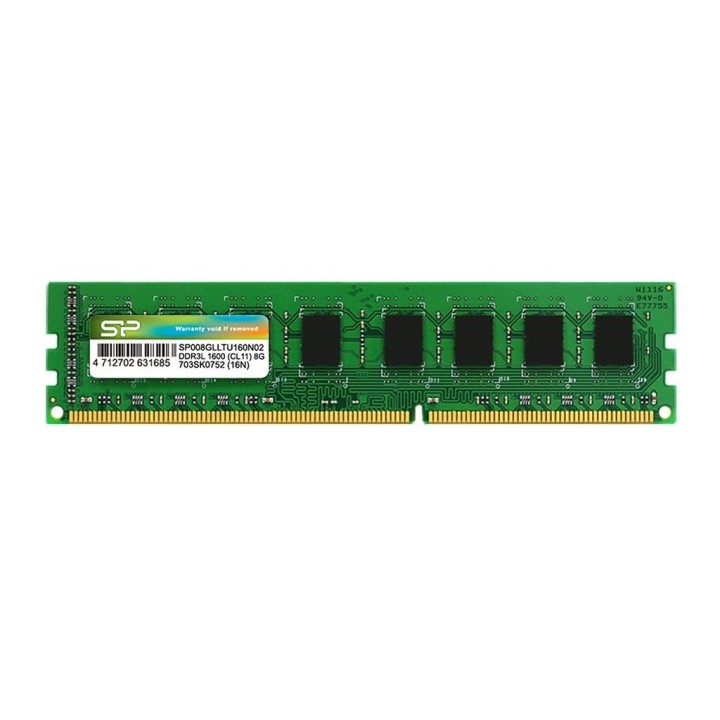
Pamięć DDR3 8GB/1600(1*8G) CL11 UDIMM

MPN:
SP008GLLTU160N02
EAN:
4712702631685
Cena: 204,49 zł
Brutto 166,25 zł netto
Dostępność produktu: Dostępny 11 szt.
Czas dostawy Wysyłka w ciągu 2 dni roboczych
Koszt dostawy Dostawa od 11,99 zł

Akceptowane płatności

Opis produktu

Do produkcji pamięci DDR3L UDIMM wykorzystane są jedynie wyższej jakości komponenty.

Specyfikacja

  • Rodzaj pamięci: DDR3L (Low Voltage)
  • Całkowita pojemność pamięci: 8 GB
  • Częstotliwość szyny pamięci: 1600 MHz
  • Liczba pamięci w zestawie: 1
  • CAS Latency: CL11
  • Obsługa ECC: Nie
  • Uwaga: CE+WEEE

Szczegóły produktu

Specyfikacja

  • Typ pamięci RAM DDR3L
  • Opóźnienie CAS CL11
  • Pojemność zestawu RAM (GB) 8 GB
  • Format modułu RAM DIMM
  • Taktowanie efektywne RAM (MT/s) 1600 MT/s
  • Pojemność jednego modułu (GB) 8 GB
  • Liczba modułów (szt.) 1 szt.
  • ECC Nie
  • Napięcie pamięci (V) 1,35 V

Producent

Producent

Silicon Power Netherlands B.V.

Antennestraat 16 1322 AB Almere Holandia

E-mail: service@eu.silicon-power.com

Telefon: +31 8 556 00010

Osoba odpowiedzialna w UE

Silicon Power Netherlands B.V.

Antennestraat 16 1322 AB Almere Holandia

E-mail: service@eu.silicon-power.com

Telefon: +31 8 556 00010

Bezpieczeństwo

Informacje o bezpieczeństwie

List of RAM security warnings based on the requirements of Regulation (EU) 2023/988 on General Product Safety (GPSR) 1. Risk of hardware damage: * Make sure you shut down your computer before installing or disassembling RAM to avoid electrical damage. * Check the compatibility of RAM with your computer's motherboard to avoid problems with system operation. 2. Risk of cuts: * Be careful when manipulating RAM to avoid cuts to sharp edges. 3. Electrostatic hazard: * Protect your RAM from electrostatic discharge (ESD) that can damage electronic components. Use an antistatic band and work on an antistatic surface. 4. Risk of incorrect assembly: * Thoroughly insert RAM modules into the sockets to ensure proper connection and avoid problems with system operation. 5. Overheating: * Provide adequate ventilation in the computer case to prevent overheating of RAM, which can lead to unstable system operation. 6. Voltage: * Make sure the voltage settings in the BIOS are appropriate for the installed RAM to avoid damage or malfunction. 7. Hazard for children: * Keep RAM out of reach of children to prevent ingestion of small items. 8. Suitable use: * Use RAM for its intended purpose, avoid extreme conditions that can lead to damage. 9. Disassembly: * Carefully disassemble the RAM so as not to damage the modules or sockets on the motherboard. 10. Disposal: * Dispose of used RAM in accordance with local e-waste recycling regulations.

Ładowanie...
Wróć na górę