- Nowy
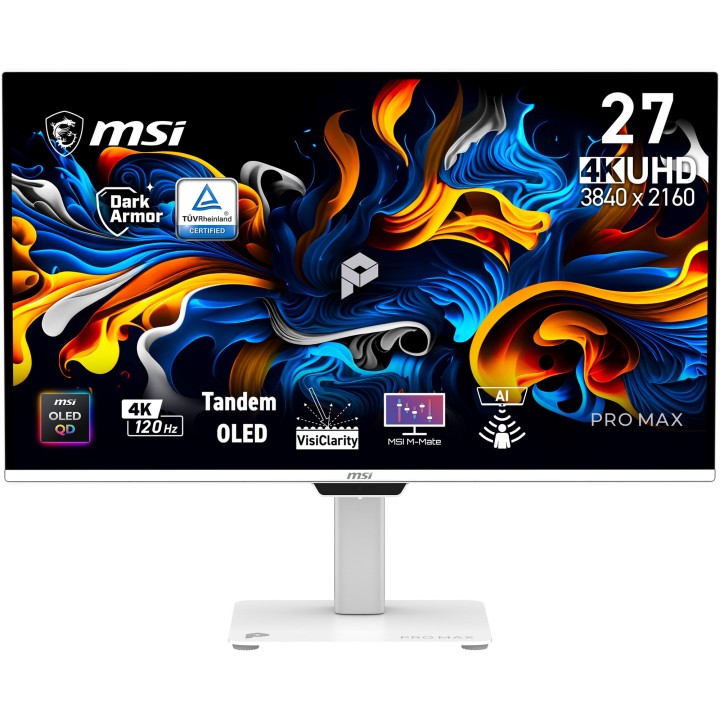
Monitor MSI PRO MAX 271UPXW12G QD-OLED 120 Hz obrazki
Raty i finansowanie
Monitor MSI PRO MAX 271UPXW12G QD-OLED 120 Hz
- MPN:
- PROMAX271UPXW12G
- EAN:
- 4711377421270
Akceptowane płatności





Opis produktu
Ciesz się oszałamiającą klarownością obrazu dzięki monitorowi MSI PRO MAX 271UPXW12G – 27-calowemu monitorowi OLED, który wprowadza do Twojego miejsca pracy blask technologii Quantum Dot. Dzięki natywnej rozdzielczości 3840 x 2160 oraz gamie kolorów obsługującej 1,07 miliarda barw monitor ten zapewnia żywe obrazy, idealne do wszelkich zastosowań profesjonalnych i kreatywnych. Współczynnik kontrastu 1 500 000:1 oraz jasność 1000 cd/m² gwarantują, że każdy szczegół jest wyświetlany z głębią i wyrazistością.Monitor ten jest wyposażony we wbudowany hub USB 3.1 oraz przełącznik KVM, zapewniające płynną łączność i możliwości wielozadaniowości. Położenie wyświetlacza można łatwo regulować dzięki opcjom zmiany wysokości, obrotu w pionie i pochylenia, co zwiększa komfort podczas długotrwałego użytkowania. Dzięki wielu wejściom sygnałowym, w tym 2x HDMI, DisplayPort i 2x USB-C, zapewnia wszechstronność w obsłudze różnych urządzeń, co czyni go idealnym wyborem do każdej konfiguracji.
27-calowy monitor OLED z technologią Quantum Dot
Natywna rozdzielczość 3840 x 2160 zapewnia ostry obraz
Wbudowany hub USB i przełącznik KVM zapewniające większą łączność
Szeroki zakres regulacji wyświetlacza zapewniający ergonomiczny komfort
Jasność 1000 cd/m² przy współczynniku kontrastu 1 500 000:1
- MPN:
- PROMAX271UPXW12G
- EAN:
- 4711377421270
Szczegóły produktu
- Marka MSI
- Kod produktu 6a0daac0bbb5ec9f68bcdbff
- Dostępność 9 Przedmioty
- EAN13 4711377421270
- MPN PROMAX271UPXW12G
Specyfikacja
- Przekątna ekranu (cal) 26,5 cal
- Rozdzielczość natywna 3840 × 2160
- Typ matrycy QD-OLED
- Częstotliwość odświeżania (Hz) 120 Hz
-
Wejścia obrazu
DisplayPort
HDMI
USB-C
Producent
Producent
MSI Polska SP. z o. o.
Magazynowa 1 55-040 Kobierzyce Polska
E-mail: info.pl@msi.com
Osoba odpowiedzialna w UE
MSI Computer Europe B.V.
Science Park 5706 5692ER Son Eindhoven Netherlands
E-mail: GPSR@msi.com
Telefon: +31-40-267-6100
Bezpieczeństwo
Informacje o bezpieczeństwie
List of computer monitor safety warnings based on the requirements of General Product Safety Regulation (EU) 2023/988 (GPSR): * Risk to vision: Long-term gazing at the monitor screen may cause eye strain, dry eyes or headaches. Limit the working time with the monitor. * Take regular breaks. * Maintain proper distance from the screen. * Ensure proper lighting in the room. Set the brightness and contrast of the monitor to a comfortable level. Ergonomics: Incorrect position when working with the monitor can lead to back, neck, and shoulder pain Set the monitor to the correct height so that the top edge of the screen is at eye level or slightly below. * Use an adjustable chair and desk to ensure an ergonomic position. * Maintain proper posture while sitting. * Risk of electric shock: Improper use or damage to the monitor can lead to electric shock. * Do not use the monitor in humid environments. * Do not touch the monitor with wet hands. * Do not put any items inside the monitor. If the power cable is damaged, replace it with a new one. * Disconnect the monitor from power before cleaning. * Fire risk: Overheating or short circuiting in the monitor can cause a fire. * Do not cover the ventilation holes of the monitor. * Do not place the monitor near heat sources. Use only the original power supply that came with your monitor. * If the monitor overheats, disconnect it from power immediately. Mechanical damage: The fall of the monitor can cause damage and pose a threat to the user. Set the monitor on a stable surface. * Secure cables to avoid accidental tripping. * For monitor transport, use appropriate protective packaging. * Cleaning: Improper cleaning of the monitor can damage the screen or cause other problems. * Use only a soft dry cloth to clean the screen. * Do not use cleaning products containing alcohol, ammonia or other corrosive substances. * Disconnect the monitor from power before cleaning. * Disposal: Incorrect disposal of the monitor can pose a threat to the environment. Return the used monitor to the e-waste collection point. * Do not throw the monitor in a regular trash can. * Children: The monitor is not a toy and should not be used by children without supervision. * Make sure children do not touch the power cables. * Make sure kids don't play around with the monitor packaging. * Repairs: Do not try to repair the monitor yourself. * Any repairs should be done by qualified personnel. * Monitor portability: Be careful when moving your monitor. * Disconnect all cables before moving. * Use appropriate packaging. * Weather conditions: Do not expose the monitor to extreme temperatures or moisture. * Protect your monitor from direct sunlight. * Adjustable settings: Do not use extreme brightness or contrast settings. * These can cause faster eye strain. * Noise: If the monitor makes disturbing noises, turn it off immediately. * Contact the technical service. * Environmental protection: Be sure to turn off the monitor when not in use. * You save energy this way. Software: Use only the software provided by the manufacturer. * You will avoid compatibility issues.
Monitory








- Nowy


Ostatnio oglądane
Produkty, które ostatnio zwróciły Twoją uwagę.
- Nowy