- Nowy

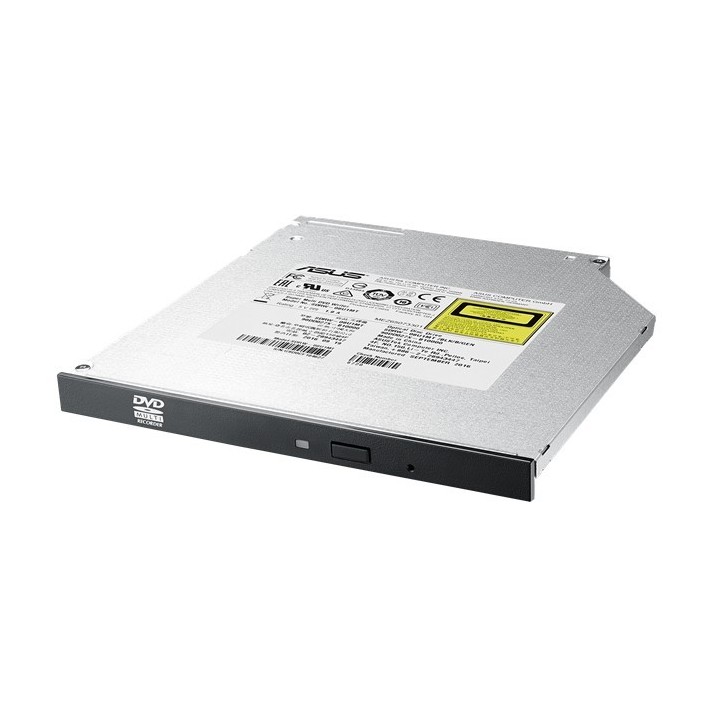
ASUS SDRW-08U1MT to smukła wewnętrzna nagrywarka DVD, która oferuje ekstremalnie wysokie prędkości nagrywania płyt DVD (8X). Zapewnia ona użytkownikom wygodne rozwiązanie do wypalania płyt w ultrasmukłej i lekkiej obudowie.
Najoszczędniejszy napęd
Ciche odtwarzanie
Najlepsza jakość zapisu
ASUS Polska SP. z o.o.
Cybernetyki 9 02-677 Warszawa Polska
E-mail: sales@asus-polska.pl
ASUS Polska Sp. z o.o.
Harkort str 21-23 40880 Ratingen Germany
E-mail: sales@asus-polska.pl
Telefon: 22 571 80 00
List of safety warnings for laptop drives based on the requirements of Regulation (EU) 2023/988 on General Product Safety (GPSR) 1. Risk of electric shock: * Make sure the drive is disconnected from power during installation or disassembly. * Do not touch the power pins with wet hands. 2. Risk of mechanical damage: * Protect the drive from falling or impact. * Use the right tools for assembly. 3. Risk of overheating: * Provide adequate ventilation in the laptop case. * Do not block ventilation openings. 4. Compatibility: * Make sure the drive is compatible with your laptop model. * Please check the specification before purchasing. 5. Installation: * Follow the manufacturer's instructions during installation. * Do not use excessive force during assembly. 6. Software: * Use current drivers to drive. * Download drivers only from trusted sources. 7. Batteries (if applicable): * Use only original batteries supplied by the manufacturer. * Do not expose the battery to high temperatures. 8. Data storage: * Back up important data regularly. * Drives may fail, which can result in data loss. 9. Cleaning: * Clean the drive only with a dry, soft cloth. * Do not use any cleaning liquids. 10. Children: * Store small items such as screws out of reach of children. * Do not allow children to manipulate the drive. 11. Removing the drive: * Before removing the drive, make sure that the operating system is turned off. * Gently remove the drive to avoid damage. 12. Disposal: * Dispose of used drive to the recycling point of electronics. * Do not throw the drive into ordinary garbage. 13. Mechanical damage: * Check the drive for visible mechanical damage before installation. * Do not use damaged drive. 14. Environmental conditions: * Avoid using and storing the drive in extreme temperatures and humidity. * Do not expose to direct sunlight. 15. Cables and connectors: * Make sure all cables and connectors are properly connected. * Use only manufacturer-approved cables. 16. Spare parts: * Use only the spare parts recommended by the manufacturer. * Incorrect parts can damage your drive or laptop. 17. Service: * Repairs and servicing should be carried out by qualified personnel. * Do not try to repair a faulty drive yourself if you do not have the proper qualifications. 18. Inviolability of warranty seals: * Removal or breach of warranty seals may void the warranty. * Do not interfere with the elements secured with seals. 19. Travelling: * Secure the drive during transport. * Avoid exposure to shocks. 20. Safety warnings: * Do not modify or modify the drive. * Incorrect modification can be dangerous.

Produkty, które ostatnio zwróciły Twoją uwagę.