- Nowy
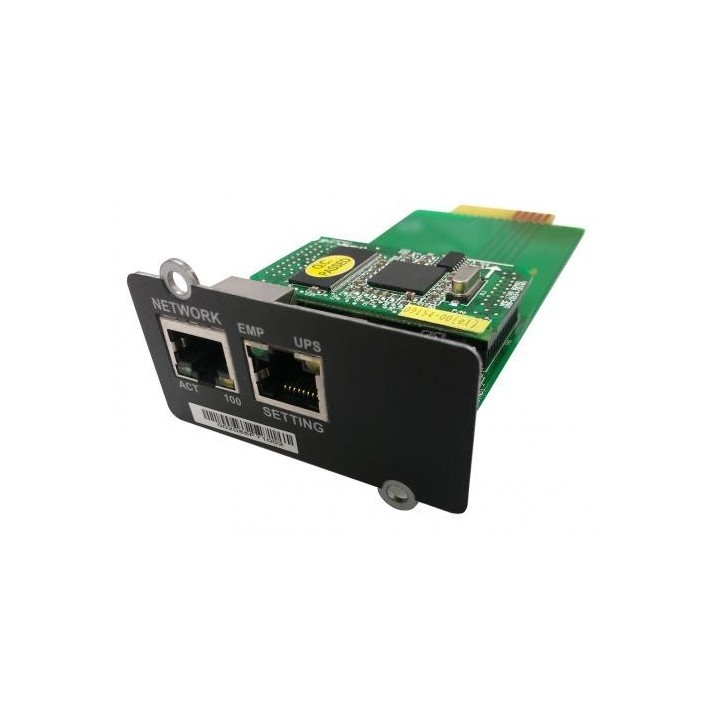
EVER T/KKON-0018/00 Ever Network Management Card NMC for PowerLine RT PLUS 6K/10K obrazki
EVER T/KKON-0018/00 Ever Network Management Card NMC for PowerLine RT PLUS 6K/10K
Opis produktu
Karta Sieciowa NMC pozwala na zdalne zarządzanie zasilaczem UPS poprzez sieć lokalną, wewnętrzną (Intranet) lub zdalnie poprzez Internet. Sterowanie i obsługa UPS-a może odbywać się poprzez agentów SNMP, interfejs strony HTTP, bądź terminal Telnet.Kartę Sieciową NMC podłącza się za pośrednictwem złącza RJ-45 bezpośrednio do sieci lokalnej. Odbywa się to bez zajmowania portów szeregowych i bez konieczności używania osobnych programów zarządzających do każdego zasilacza. Dzięki zastosowanemu systemowi zabezpieczeń, dostęp do parametrów i kontroli UPS-a odbywa się z dowolnego komputera, pod warunkiem podania prawidłowego hasła do odczytu. W ten sposób administrator firmowej sieci Ethernet może szybko zareagować na bieżące potrzeby - związane z zasilaniem gwarantowanym - z każdego miejsca w firmie.W sytuacji gdy wyjście zasilacza jest w stanie nieprawidłowym lub wystąpiły inne zdarzenia, karta zarządzająca pozwala na bezpieczne zamknięcie systemu operacyjnego na serwerze lub stacji roboczej, dzięki współpracy z programem SPS (System Protect Software), który można instalować na różnych systemach operacyjnych. Zamknięcie systemu może nastąpić w przypadku wystąpienia takich zdarzeń jak: nieprawidłowy stan wyjścia zasilacza, niski poziom baterii, przeciążenie lub przegrzanie zasilacza, zamknięcie według harmonogramu itd. Użytkownik może wybrać warunki, których wystąpienie spowoduje, że karta zarządzająca poinformuje SPS o zdarzeniu, a SPS bezpiecznie zamknie system operacyjny, zgodnie z ustawieniami.
Bezpośrednie połączenie z siecią lokalną poprzez złącze RJ-45
Zdalna obsługa UPS-a za pośrednictwem protokołu SNMP, strony WWW lub terminala Telnet
Funkcja zegara czasu rzeczywistego (RTC)
Wsparcie dla szyfrowania SSL
Bezpieczne zamykanie systemu operacyjnego
Obsługa zasilacza UPS poprzez standardową bazę obiektów MIB lub zdefiniowaną przez użytkownika
Możliwość zamykania systemu z redundantnymi zasilaczami
Specyfikacja
- Opis produktu: Ever adapter zdalnego zarządzania 10100 Ethernet
- Rodzaj urządzenia: Adapter zdalnego zarządzania
- Typ obudowy: Moduł podłączany
- Porty: 10100 Ethernet
- Rodzaj okablowania: Ethernet 10BaseT, Ethernet 100BaseTX
- Protokół komunkacyjny danych: 10Mb LAN, 100Mb LAN
Szczegóły produktu
- Marka EVER
- Kod produktu 661024d471a267703cf0c5be
- Dostępność 1 Przedmiot
- EAN13 5907683605971
- MPN TKKON001800
Producent
Producent
Ever sp. z o.o.
Wołczyńska 19 60-003 Poznań Polska
E-mail: ups@ever.eu
Formularz kontaktowy: https://ever.eu/kontakt/
Telefon: +48 61 650 04 00
Bezpieczeństwo
Informacje o bezpieczeństwie
List of UPS safety warnings based on the requirements of Regulation (EU) 2023/988 on General Product Safety (GPSR) 1. Risk of electric shock: * Make sure the UPS is plugged into an outlet with grounding to avoid shock. * Do not touch the UPS or cables with wet hands to avoid electric shock. * Do not use UPS in areas with high humidity, e.g. in the bathrooms. 2. Risk of overload: * Do not connect more devices to the UPS than its specification allows to avoid overloading and damage. * Check that the devices connected to the UPS do not exceed its maximum power. 3. Risk of overheating and fire: * Do not block ventilation openings in the UPS to ensure adequate air circulation. * Do not place the UPS near heat sources or in enclosed spaces where overheating may occur. * Use only the original cables and accessories provided by the manufacturer to avoid the risk of fire. * In case of UPS failure or overheating, disconnect it from power immediately. 4. Risk of battery damage: * Do not expose the UPS battery to high temperatures, humidity or direct sunlight. * Do not attempt to open, damage or short-circuit the UPS battery. * Replace batteries only with models recommended by the manufacturer and according to the instructions. * Recycle used batteries in accordance with local regulations. 5. Environmental hazards: * Do not use UPS in environments with high dustiness or exposure to chemicals. * Protect your UPS from flooding and moisture. 6. During cleaning: * Before cleaning, disconnect the UPS from the power supply and use a dry, soft cloth. * Do not use aggressive cleaners or solvents. 7. Transportation and storage: * Transport your UPS in its original packaging or properly secured to avoid damage. * Store your UPS in a dry and cool place, away from heat and moisture sources. 8. Children and pets: * Keep the UPS and its cables away from children and pets to avoid accidental damage or electric shock. 9. Additional warnings: * If you notice smoke, unusual smell or sound coming out of the UPS, disconnect it from the power supply immediately. * Regularly check the status of your UPS and its cables to detect any damage. * In case of long-term power outage, disconnect non-critical devices from the UPS to save battery power. * Follow the UPS manual provided by the manufacturer. 10. Disposal: * Dispose of used UPS to an e-waste collection point to ensure it is properly recycled and avoid negative environmental impacts.
Zasilacze awaryjne UPS
- Nowy
- Nowy
- Nowy
- Nowy
- Nowy
- Nowy
- Nowy
- Nowy
Ostatnio oglądane
Produkty, które ostatnio zwróciły Twoją uwagę.
- Nowy
- Nowy
- Nowy
- Nowy

- Nowy
- Nowy
- Nowy