- Nowy








HP 144A Imaging Drum Cartridge obrazki
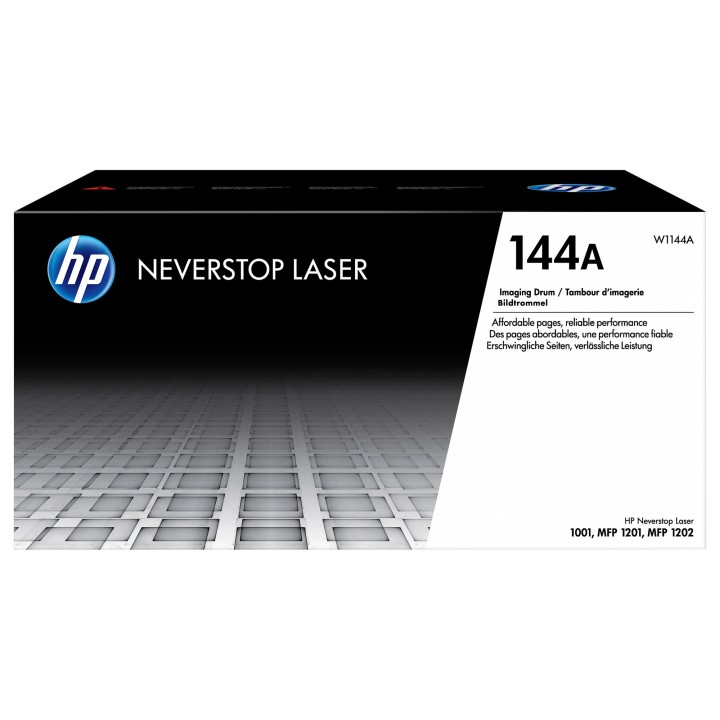
HP 144A Imaging Drum Cartridge
Opis produktu
Doświadcz wyjątkowej jakości wydruku przy wykorzystaniu oryginalnych materiałów HP.
Produkty HP działają niezawodnie za każdym razem
Zyskaj jakość wydruku, z której możesz być dumny
Specyfikacja
- Opis produktu: HP 144A czarny oryginał Bęben
- Typ produktu: Bęben
- Technologia druku: Laserowa
- Drukowany kolor: Czarny
- Uzysk: Do 20000 stron
- Kompatybilne z: Neverstop 1001nw, 1001nw CartridgeFree Laser Tank, 1202nw CartridgeFree Laser Tank, 1202w CartridgeFree Laser Tank; Neverstop Laser MFP 1201n, MFP 1202nw
Szczegóły produktu
- Marka HP Inc.
- Kod produktu 66102af171a267703cf3d7ca
- Dostępność 21 Przedmioty
- EAN13 0193905679379
- MPN W1144A
Specyfikacja
- Kompatybilne marki HP
- Oryginalność materiału Oryginalny
- Kolor materiału Czarny
Producent
Producent
HP Inc Polska Sp. z o.o.
ul. Szturmowa 2a 02-678 Warszawa Polska
E-mail: support@hp.com
Formularz kontaktowy: https://www.hp.com/us-en/contact-hp/contact.html
Telefon: +1 650-857-1501
Osoba odpowiedzialna w UE
HP Inc Polska sp. z o.o
Plac marsz. Józefa Piłsudskiego 1 00-078 Warszawa Polska
E-mail: support@hp.com
Bezpieczeństwo
Informacje o bezpieczeństwie
List of printer and scanner drum safety warnings based on the requirements of General Product Safety Regulation (GPSR) 2023/988 * Make sure the drum is compatible with your printer or scanner model. The wrong drum can damage the device. * Do not touch the surface of the drum. This can affect the print quality and life of the drum. * Replace the drum according to the manufacturer's instructions. Incorrect installation may cause damage to the printer. * Protect the drum from direct sunlight and high humidity. This can shorten its lifespan. * Do not use damaged drum. This can affect the quality of the print and damage the printer. * Keep the drum out of reach of children. The danger of swallowing small parts. * Use the drum as intended. Do not attempt to modify it or use it for other purposes. * Do not open or disassemble the drum. It contains substances that can be harmful to health. * If the substance from the drum comes into contact with the skin or eyes, immediately wash it with plenty of water and consult a doctor. * Recycle the used drum in accordance with local regulations. Do not throw it into ordinary waste. * Do not expose the drum to extreme temperatures. This can affect its performance and shorten its lifespan. * Use only recommended cleaning products to clean printer components that may come into contact with the drum. Strong detergents can damage it. * Regularly check the condition of the drum. If you notice any damage, replace it immediately. * If the printer displays an error message related to the drum, immediately check its status and correctness of installation. * When replacing the drum, make sure the printer is off power. This will minimize the risk of electric shock. * After replacing the drum, make sure all printer covers and protections are properly mounted. * If you have any doubts about the use of the drum, please contact the technical service of the printer manufacturer. * When cleaning the printer, avoid direct contact of cleaning agents with the drum surface.
Bębny i taśmy barwiące
Ostatnio oglądane
Produkty, które ostatnio zwróciły Twoją uwagę.
- Nowy
- Nowy