- Nowy

HPE Ethernet Adapter 10Gb 2-port BASE-T Broadcom BCM57416 obrazki
HPE Ethernet Adapter 10Gb 2-port BASE-T Broadcom BCM57416
Opis produktu
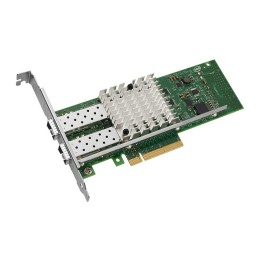
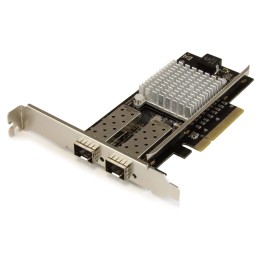
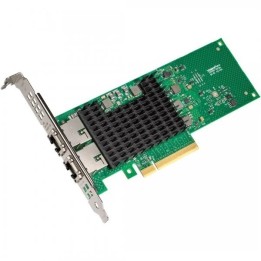
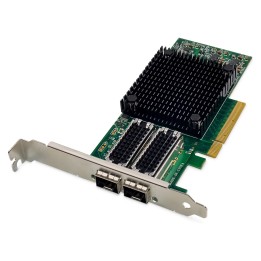
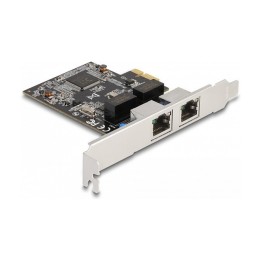
Adapter 2-portowa karta sieciowa Broadcom BCM57416 Ethernet 10 Gb/s BASE-T do HPE
Czy Twoje centrum danych nieustannie stawia czoła wyzwaniom, aby zapewnić większe bezpieczeństwo i niezawodność w ekonomicznym i skalowalnym rozwiązaniu obsługującym przepustowość sieci?
Adaptery Ethernet HPE Gen10 Plus to rozwiązania Ethernet 1 Gb, 10 Gb, 10/25 Gb oraz 100 Gb i 200 Gb, które są skalowalne i kompatybilne z serwerami HPE Gen10 Plus dla usług chmury hybrydowej, mobilnych danych i aplikacji do strumieniowego przesyłania wideo.
Twój serwer jest podstawą Twojego centrum danych, ale nie działa sam. Kiedy jedno ogniwo w łańcuchu komponentów zwalnia, zwalnia też reszta operacji. Zapewnij przepływ swojej sieci i danych dzięki bezproblemowemu ekosystemowi serwerów, kart sieciowych, urządzeń nadawczo-odbiorczych, kabli i przełączników HPE.
Dane
- Szybkość transmisji danych 10 Gb
- Liczba portów 2
- Typ magistrali PCIe Gen 3x8
- Form Factor Stand up
Specyfikacja
- Opis produktu: Broadcom BCM57416 adapter sieciowy PCIe 3.0 x8 Gigabit Ethernet 10Gb Ethernet x 2
- Rodzaj urządzenia: Adapter sieciowy
- Typ obudowy: Karta wkładana do gniazda
- Typ interfejsu (szyny): PCI Express 3.0 x8
- Wersja specyfikacji PCI: PCIe 3.0
- Porty: Gigabit Ethernet 10Gb Ethernet x 2
- Protokół komunkacyjny danych: 1GbE, 10GbE, RoCE v1, RoCE v2
- Szybkość transmisji danych: 10 Gbps
- Procesor: 1 x Broadcom BCM57416
- Zaprojektowany dla: Nimble Storage dHCI Medium Solution with HPE ProLiant DL325 Gen10; ProLiant DL20 Gen10, DL325 Gen10, DL345 Gen10, DL360 Gen10, DL365 Gen10, DL380 Gen10, DL385 Gen10, ML30 Gen10, XL220n Gen10, XL225n Gen10, XL290n Gen10
Szczegóły produktu
- Marka HP Enterprise
- Kod produktu 6610444071a267703c023fa4
- Dostępność 19 Przedmioty
- EAN13 0190017443942
- MPN P26253B21
Specyfikacja
- Interfejs do komputera Ethernet
Producent
Producent
HP Inc Polska Sp. z o.o.
Szturmowa 2a 02-678 Warszawa Polska
E-mail: support@hp.com
Bezpieczeństwo
Informacje o bezpieczeństwie
List of network card security warnings based on the requirements of General Product Safety Regulation (GPSR) 2023/988: * Make sure that the installation of the network adapter complies with the manufacturer’s instructions. Incorrect installation can lead to damage to your device or computer. * Before installing or disassembling the network card, turn off the computer and disconnect it from power. * Protect your network card from moisture and extreme temperatures. Do not use it in places where it may be exposed to water or direct sunlight. * Use the network adapter for its intended purpose. Do not try to modify or repair it on your own. * Regularly check that the network card is properly attached to the motherboard slot. A loose connection can cause network problems. * Make sure your network adapter drivers are up to date. Outdated drivers can lead to compatibility and security issues. * Use a dry, soft cloth when cleaning the network card. Avoid using cleaning products that can damage components. * If your network card has an antenna, make sure it is properly attached and undamaged. A damaged antenna can affect signal quality. * Pay attention to sharp edges or card components that may pose a potential injury hazard during installation or disassembly. * If your network card has electronic components, keep it away from children.