- Nowy
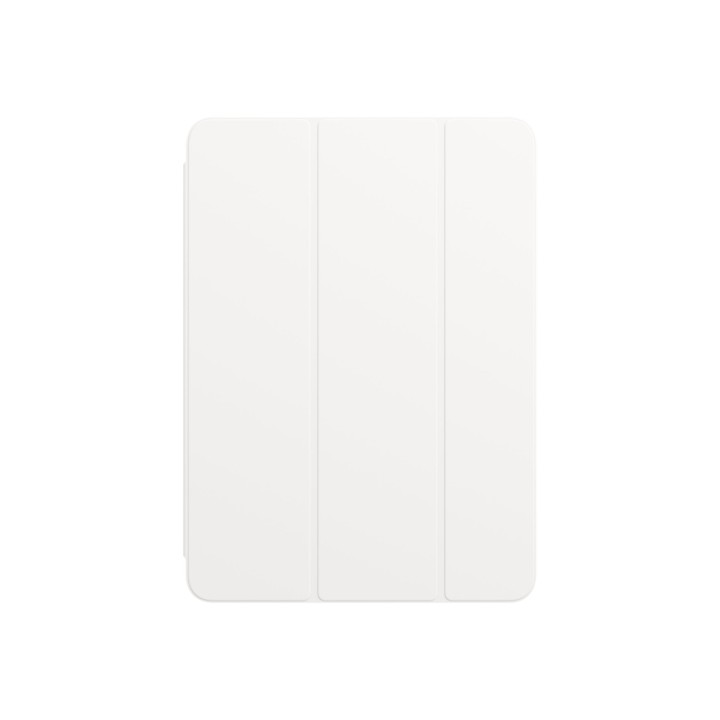
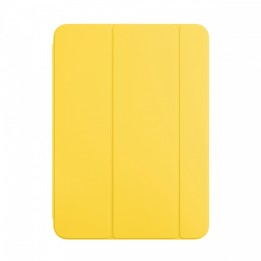
Etui Smart Folio do iPada Air (4. generacji) - białe obrazki
Etui Smart Folio do iPada Air (4. generacji) - białe
Opis produktu
Etui Smart Folio do iPada Air (4. generacji) - białe
Wykonane z jednego kawałka poliuretanu etui Smart Folio do iPada Air skutecznie chroni urządzenie z obu stron. Jego otwarcie automatycznie budzi iPada, a zamknięcie usypia. Etui Smart Folio można łatwo składać na różne sposoby, zmieniając je w podstawkę do czytania, oglądania, pisania lub rozmów FaceTime.
Specyfikacja
- Typ (etui): etui - klapka
- Pasuje do: iPad Air (4. generacji)
- Kolor (wyliczeniowy): Biały
- Materiał: Poliuretan (PU)
Szczegóły produktu
- Marka Apple
- Kod produktu 660fbccd71a267703cb1a80d
- Dostępność 2 Przedmioty
- EAN13 0194252087459
- MPN MH0A3ZMA
Producent
Producent
Apple Distribution International Limited
Hollyhill Industrial Estate T23 YK84 CORK Ireland
E-mail: support@apple.com
Formularz kontaktowy: https://support.apple.com/en-sa
Telefon: 1 408 996 1010
Osoba odpowiedzialna w UE
Apple Distribution International Ltd.
Hollyhill Industrial Estate, Hollyhill T23 YK 84 Cork Irlandia
E-mail: emolino@apple.com
Bezpieczeństwo
Informacje o bezpieczeństwie
List of tablet safety warnings and accessories based on the requirements of General Product Safety Regulation (EU) 2023/988 (GPSR) * Risk of electric shock: * Connect the tablet charger only to an outlet with grounding. * Do not touch the charger or cable with wet hands. * Use only the original charger provided by the manufacturer or approved by the manufacturer. * Risk of hearing damage: * Use headphones for your tablet in moderation to avoid permanent hearing damage. Adjust the volume to a safe level. * Fire risk: * Do not cover the tablet while charging to avoid overheating. * Do not use the tablet near flammable materials. * Do not leave your tablet in direct sunlight or in a hot car. * Risk of injury: * Use the tablet on a stable surface to avoid falling and damage. * Use a protective case to reduce the risk of damage to your tablet in the event of a fall. * Risk of eye damage: * Take regular breaks when using the tablet to avoid eye strain. * Adjust the brightness of your tablet screen to match the lighting conditions. * Risk of suffocation: * Keep small tablet accessories such as SIM cards and memory cards away from children to avoid ingestion. * Risk of electromagnetic interference: * Turn off the tablet in hospitals or other places where interference with electronic devices is prohibited. * Risk of skin allergy: * If you experience an allergic reaction to the materials from which the tablet or accessories are made, stop using and consult your doctor. * Battery Hazards: * Do not damage your tablet battery. * Do not expose the battery to high temperatures. * Use only the original battery or manufacturer approved. * Cleaning Hazards: * Turn off the tablet before cleaning. * Use only a soft, dry cloth to clean your tablet. * Do not use liquids or cleaning products that can damage your tablet. * Maintain proper operating temperature: * Use the tablet at temperatures from 0°C to 35°C. * Maintain proper humidity: * Use the tablet in humidity from 5% to 95%. * Remember about the appropriate service: * Return the tablet to qualified service in case of damage or malfunction. * Store your tablet properly: * Keep your tablet out of reach of children and pets. * Store your tablet in a place protected from moisture and extreme temperatures. * Incorrect charging: * Do not leave the tablet connected to the charger for longer than necessary to fully charge.
Akcesoria do tabletów

- Nowy
- Nowy
- Nowy
- Nowy
- Nowy
- Nowy

- Nowy
- Nowy