- Nowy
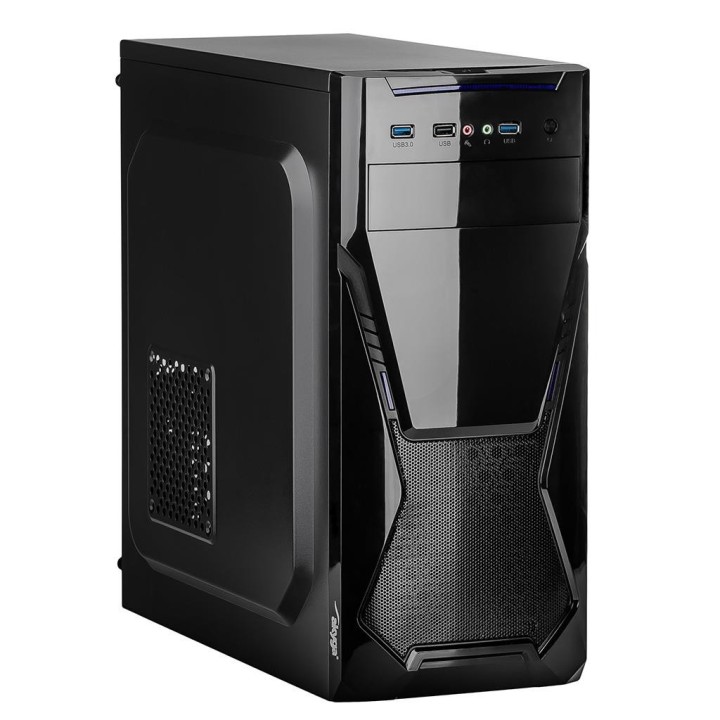
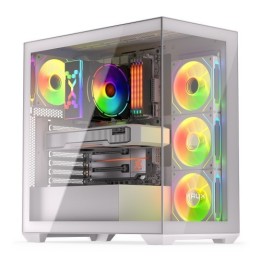
Obudowa Midi ATX Akyga AK13BK 2xUSB 3.0 1xUSB 2.0 bez zasilacza obrazki
Obudowa Midi ATX Akyga AK13BK 2xUSB 3.0 1xUSB 2.0 bez zasilacza
Opis produktu
Obudowa Midi ATX Akyga AK13BK 2xUSB 3.0 1xUSB 2.0 bez zasilacza
Specyfikacja
- Typ obudowy: Midi Tower
- Format płyty: Mini-ITX
- Kolor obudowy: Czarny (Black)
- Materiał: Stal ocynkowana galwanicznie
- Obudowa z zasilaczem: Nie
- Ilość zatok zewn. 5.25": 1 szt.
- Ilość zatok zewn. 3.5" (A): 0 szt.
- Ilość zatok wewn. 3.5" (B): 3 szt.
- Ilość zatok wewn. 2.5" (C): 3 szt.
- Ilość zatok wewn. 2.5" lub 3.5" (D): 3 szt.
- Łączna ilość zatok na dyski (A+B+C+D): 6
- Obsługa beznarzędziowa: Nie
- Gniazda na panelu: HD Audio (microphone + line-out)
- Miejsca na karty rozszerzeń: 7
- Maksymalna długość karty graficznej: 385 mm
- Okno: Nie
- Maksymalna wysokość wentylatora CPU: 150 mm
- Boczny kanał wentylacyjny: Nie
- Ilość wentylatorów (zainstalowanych): 0 szt.
- Ilość wentylatorów (max): 3 szt.
- Certyfikat: CE
- Wymiary [G x S x W] (mm): 418 x 200 x 412
- Waga (kg): 2.800
- Wyposażenie dodatkowe: W zestawie znajduje się komplet śrubek montażowych.
- Informacje dodatkowe: Wewnętrzne zatoki 5.25" 1 szt
Szczegóły produktu
- Marka AKYGA
- Kod produktu 663bac3e5281814cc3b8a7a7
- Dostępność 2 Przedmioty
- EAN13 5901720132420
- MPN AK13BK
Specyfikacja
- Format obudowy Midi Tower
- Zasilacz w zestawie Nie
- Liczba wentylatorów w zestawie (szt.) 0 szt.
- Obsługiwane formaty płyt Mini-ITX
- Maksymalna długość GPU (mm) 385 mm
- Maksymalna wysokość chłodzenia CPU (mm) 150 mm
- Okno boczne Nie
Producent
Producent
Akyga Europe Sp. z o.o.
Wrocławska 1C 52-200 Suchy Dwór Polska
E-mail: contact@akyga.com
Telefon: +48 713 644 644
Bezpieczeństwo
Informacje o bezpieczeństwie
List of safety warnings for computer enclosures based on the requirements of General Product Safety Regulation (EU) 2023/988 (GPSR): 1. Risk of electric shock: * Make sure your computer's power supply is properly grounded. * Do not touch the power supply components with wet hands. * Disconnect the computer from power before opening the case. 2. Risk of cuts: * Beware of sharp metal edges when assembling components. * Secure the edges that can cause cuts. * Use protective gloves when working with the case. 3. Risk of fire: * Do not block ventilation openings in the housing. * Make sure that your computer components do not overheat. * Use a power supply with adequate power to avoid overloading. 4. Risk of damage to components: * Ensure proper air circulation in the housing. * Do not place heavy objects on the housing to avoid damage. * Make sure all components are properly fixed in the housing. 5. Hazards for children: * Keep small items (screws, jumpers) out of reach of children. * Do not allow children to open the computer case themselves. 6. Weight Hazards: * When moving your computer case, make sure you are able to support its weight. * Ask the other person for help if the case is too heavy. 7. Cleaning warnings: * Disconnect the computer from power before cleaning the case. * Use a soft, dry cloth to clean the case. * Do not use cleaning products containing corrosive substances. 8. Modification warnings: * Housing modifications may affect the safety and performance of your computer. * Perform modifications only if you have relevant experience and knowledge. 9. Warnings on Dust inhalation: * When cleaning components in the housing with compressed air, use a mask. * Take special care and ensure proper ventilation.
Obudowy
- Nowy
- Nowy
- Nowy
- Nowy
- Nowy
- Nowy
- Nowy
- Nowy
- Nowy
- Nowy
Ostatnio oglądane
Produkty, które ostatnio zwróciły Twoją uwagę.