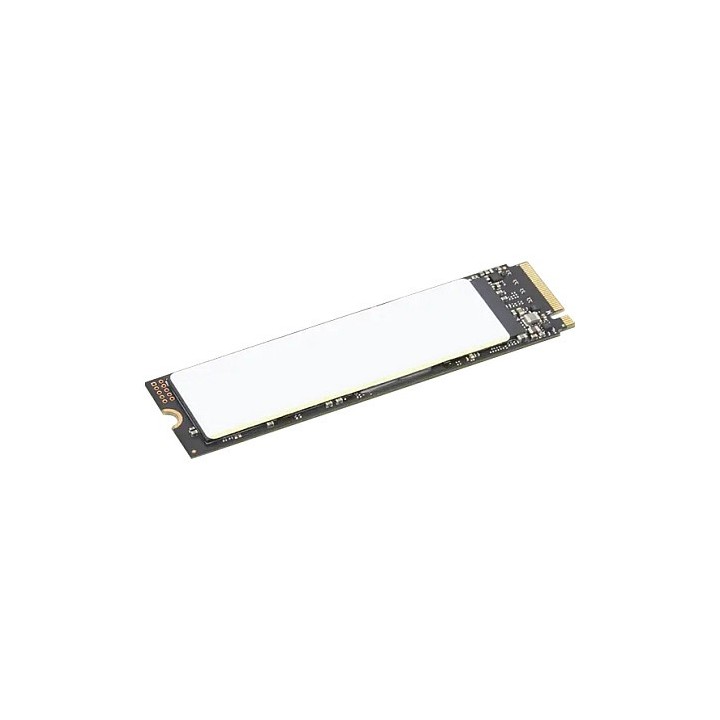
Lenovo Performance 1TB PCIe Gen4 NVMe M.2 2280 OPAL2 SSD
Opis produktu
Wysokowydajny dysk SSD Lenovo o pojemności 1 TB przeznaczony do modernizacji notebooków w formacie M.2 2280. Wykorzystuje interfejs PCIe 4.0 x4 oraz protokół NVMe, co przekłada się na bardzo wysoką przepustowość i krótkie czasy dostępu, umożliwiając szybsze uruchamianie systemu oraz płynniejszą pracę aplikacji.
Urządzenie oferuje przyspieszone transfery sekwencyjne z odczytem do 6900 MB/s i zapisem do 4400 MB/s. Konstrukcja M.2 2280 oraz kompaktowe wymiary (80 x 22 x 2,23 mm) sprawiają, że dysk jest kompatybilny z wieloma laptopami i stacjami roboczymi, ze szczególnym uwzględnieniem wybranych modeli serii ThinkPad.
Dysk wyposażono w sprzętowe szyfrowanie zgodne z TCG Opal 2.0 (OPAL2) oraz spełnia szereg międzynarodowych certyfikatów. Zakres temperatur pracy i warunki środowiskowe zapewniają niezawodność w typowych zastosowaniach mobilnych i stacjonarnych.
Specyfikacja
- Pojemność: 1 TB
- Interfejs: PCIe 4.0 x4
- Protokół: NVMe
- Format: M.2 2280
- Szyfrowanie: TCG Opal 2.0 (OPAL2)
- Prędkość odczytu (maks.): 6900 MB/s
- Prędkość zapisu (maks.): 4400 MB/s
- Długość: 80 mm
- Szerokość: 22 mm
- Wysokość: 2.23 mm
- Waga: 7.2 g
- Temperatura pracy: 0 - 80 °C
- Wilgotność pracy: 5 - 95 %
- Certyfikaty: BSMI, FCC, ICES-003, CE, UK DOC, VCCI, KCC, RCM, CB
- Przeznaczenie: Laptop
- Seria: Performance

Szczegóły produktu
- Marka Lenovo
- Kod produktu 66932526cfd6c6e2a4c8aea7
- Dostępność 50 Przedmioty
- EAN13 0195892093091
- MPN 4XB1M86955
Specyfikacja
- Pojemność nośnika (GB) 1000 GB
- Format dysku M.2
- Interfejs dysku PCI Express 4.0
Producent
Producent
Lenovo Technology B.V. Sp. z o.o. Oddział w Polsce
ul. Gottlieba Daimlera 1 02-460 Warszawa Polska
Osoba odpowiedzialna w UE
Lenovo (Slovakia) s.r.o.
Landererova 12 811 09 Bratislava SLOVAKIA
E-mail: balenovo_sk@lenovo.com
Telefon: +421 2/686 880 00
Bezpieczeństwo
Informacje o bezpieczeństwie
List of SSD security warnings based on General Product Safety Regulation (GPSR) 2023/988 requirements: * Before installing or disassembling an SSD, make sure your computer is turned off and disconnected from power. * When installing an SSD, use the appropriate tools and screws to avoid damaging your drive or computer. * Do not open the SSD enclosure as this may result in loss of warranty and damage to the drive. * Protect your SSD from moisture, dust, and extreme temperatures. * Use SSD management software according to the manufacturer's instructions to monitor its health and performance. * Regularly back up data from your SSD to avoid data loss in the event of a drive failure. * Do not disassemble the SSD while writing or reading data, this can lead to data loss. * Do not expose your SSD to shocks, drops, or other mechanical damage. * Once usage is complete, delete data from the SSD securely to prevent unauthorized access to the data. * Follow the rules for the safe handling of electronic waste when disposing of an SSD.
Dyski SSD
Ostatnio oglądane
Produkty, które ostatnio zwróciły Twoją uwagę.