- Nowy
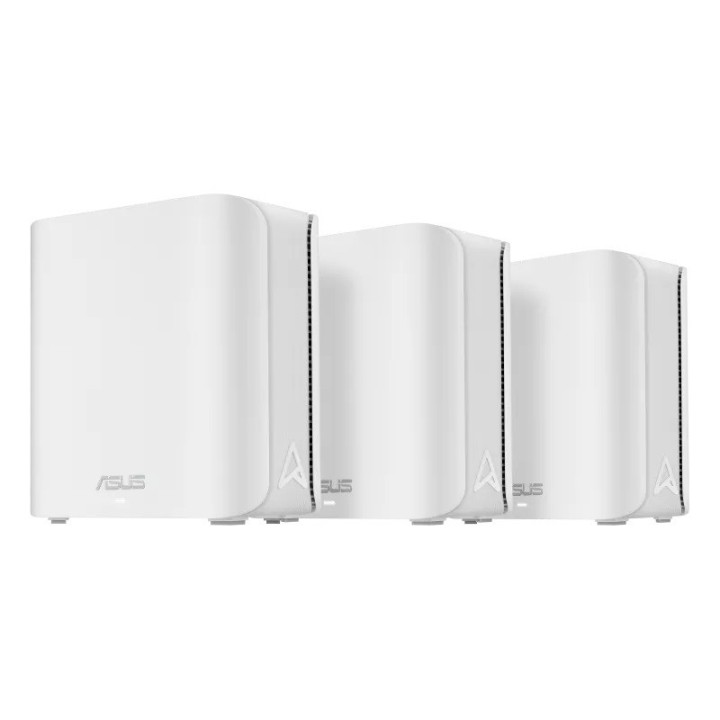
Router ZenWiFi BD4 Dual-band WiFi 7 Mesh, 3600 Mbps (3-pak) obrazki
Router ZenWiFi BD4 Dual-band WiFi 7 Mesh, 3600 Mbps (3-pak)
Opis produktu
ASUS ZenWiFi BD4
- Najnowszej generacji rozwiązanie Wi-Fi 7 - Dzięki technologii 4096-QAM ZenWiFi BD4 umożliwia ultraszybką, wydajną i stabilną transmisję sieciową z przepustowością większą o 20% w porównaniu do Wi-Fi 6.
- Dwuzakresowa sieć Wi-Fi 7 typu mesh - Dwuzakresowy system typu mesh Wi-Fi 7 (802.11be) z unikalnym rozmieszczeniem anten udostępnia większą szybkość transmisji na poziomie do 3600 Mb/s, zapewniając silne połączenie Wi-Fi w każdym kącie Twojego domu.
- Multi-link Operation (MLO) - Dzięki technologii MLO urządzenia mogą jednocześnie nadawać i/lub odbierać na różnych pasmach i kanałach. Łącza równoległe zwiększają przepustowość urządzenia, zmniejszają opóźnienia i ulepszają niezawodność.
- Smart Home Master - Technologia Smart Home Master umożliwia Ci szybkie skonfigurowanie wydzielonej, zaawansowanej sieci w różnych scenariuszach zastosowań. Technologia Smart Home Master obsługuje teraz trzy główne funkcje, które obejmują sieć IoT, sieć dla dzieci oraz sieć VPN.
- Pakiet zabezpieczeń klasy komercyjnej - ZenWiFi BD4 jest dostarczany wraz z funkcjami ASUS AiProtection Pro, kontrolą rodzicielską, a także Safe Browsing, aby zabezpieczyć Twoje domowe środowisko Wi-Fi.
Specyfikacja
- Model: ZenWiFi BD4
- Typ routera: xDSL
- Architektura sieci (switche): GigabitEthernet
- Porty we/wy (sieciówka drobna): 2 x 10/100/1000/2500 RJ-45 port (WAN)
- Standardy sieciowe: IPv6
- Pasma (sieci drobne): 5 GHz
- Liczba anten (sieci drobne): 4
- Antena (sieci drobne): Wewnętrzna
- Bezpieczeństwo: AiProtection VPN WPA/WPA2/WPA3-Personal, WPA/WPA2-Enterprise WPS Let's Encrypt DNS-over-TLS Security Scan Firewall Parental Control VPN
- Zarządzanie, monitorowanie, konfiguracja: Diagnosis Tools Feedback System System Log New Device Connect Notification Login Captcha Connection Diagnosis Auto Firmware Update Adaptive QoS: Bandwidth Monitor, Bandwidth Limiter Traditional QoS Traffic Monitor Traffic Analyzer Website History WAN: Port Forwarding Port Triggering DMZ DDNS LAN: DHCP Server IGMP Snooping IPTV Manually Assign IP Address Wake on LAN (WOL) Wireless: MU-MIMO UTF-8 SSID WiFi MAC Address Filter Wireless Scheduler Airtime Fairness RADIUS Client Universal Beamforming Explicit Beamforming
- Funkcje specjalne: Obsługa Google Assistant AiMesh: Primary AiMesh Router; AiMesh Node
- Zasilanie: Wejście AC: 110 V ~ 240 V (50 ~ 60 Hz) Wyjście DC: 12 V z maksymalnym prądem 1,5 A
- Oprogramowanie: ASUS Router APP
- Akcesoria w zestawie: ZenWiFi BD4 Kabel RJ45 Zasilacz Karta gwarancyjna Szybki przewodnik
- Kolor (wyliczeniowy): Biały
- Wymiary: 140 x 70 x 140 mm
- Uwaga: CE+WEEE
Szczegóły produktu
- Marka Asus
- Kod produktu 6785c7ff7815b66470634ab5
- Dostępność 4 Przedmioty
- EAN13 4711387580943
- MPN ZENWIFIBD43PK
Specyfikacja
- Rodzaj urządzenia Router xDSL
- Generacja Wi-Fi Wi-Fi 7
-
Pasma Wi-Fi
2.4 GHz
5 GHz - Liczba portów LAN (szt.) 2 szt.
Producent
Producent
ASUS Polska SP. z o.o.
Cybernetyki 9 02-677 Warszawa Polska
E-mail: sales@asus-polska.pl
Osoba odpowiedzialna w UE
ASUS Polska Sp. z o.o.
Harkort str 21-23 40880 Ratingen Germany
E-mail: sales@asus-polska.pl
Telefon: 22 571 80 00
Bezpieczeństwo
Informacje o bezpieczeństwie
List of safety warnings for WiFi and Access Point Routers based on the requirements of Regulation (EU) 2023/988 on General Product Safety (GPSR) 1. Risk of electric shock: * Make sure that the device is connected to a working socket with grounding. * Do not touch the plug or cable with wet hands. * Avoid using the device in places with high humidity. 2. Risk of overheating: * Provide adequate ventilation while maintaining at least 5 cm of free space around the device. * Do not block ventilation openings. 3. Fire risk: * Use only original power supplies and accessories recommended by the manufacturer. * Do not leave the device on unattended near flammable materials. 4. Hazards at high temperatures: * Do not expose the device to direct sunlight. * Avoid using the router at temperatures above the recommended range (usually 5-35°C). 5. Risk of damage during cleaning: * Before cleaning, disconnect the device from the power supply and use a soft, slightly damp cloth. * Avoid using strong detergents that can damage the surface of the device. 6. Warnings for children: * Keep power cables out of reach of children. * Make sure that children do not play with the device or accessories that can be dangerous. 7. Regularly check the technical condition of the device: * Check the condition of the device regularly for mechanical damage, cracks or other defects. * Do not use the device if it has visible mechanical damage. 8. Use in humid environments * Avoid using your router in the bathroom, in the rain or in other humid environments 9. Interference with other devices * Using a router near medical devices such as pacemakers can cause electromagnetic interference. * Keep a distance of at least 15 cm between your router and medical devices. 10. Regular maintenance * Failure to regularly clean ports and sockets can lead to damage or failure. * Clean ports and sockets regularly using a dry and clean cloth, avoiding moisture input. 11. Risk of loss of water resistance * Do not immerse in water if it is not waterproof. 12. Electromagnetic interference * Smartwatches can interfere with medical devices such as pacemakers. 13. Small parts: * Components of the device, can be swallowed by children. * Keep your device and its accessories out of reach of children. Do not allow children to use the device themselves without supervision. 14. Risk of battery damage * Improper use, such as overheating or using a non-original charger, can lead to battery damage and, in extreme cases, to battery explosion. * Charge your device at room temperature and use only original accessories. Do not expose your smartwatch to high temperatures. 15. Maintenance and cleaning * Impurities such as sweat or dirt can cause discomfort and damage to materials. * Clean your smartwatch and strap regularly with a soft, damp cloth. Avoid using harsh chemicals.
Routery Wi-Fi i Access Pointy
- Nowy
- Nowy
- Nowy
- Nowy
- Nowy
- Nowy
- Nowy
- Nowy
Ostatnio oglądane
Produkty, które ostatnio zwróciły Twoją uwagę.