- Nowy
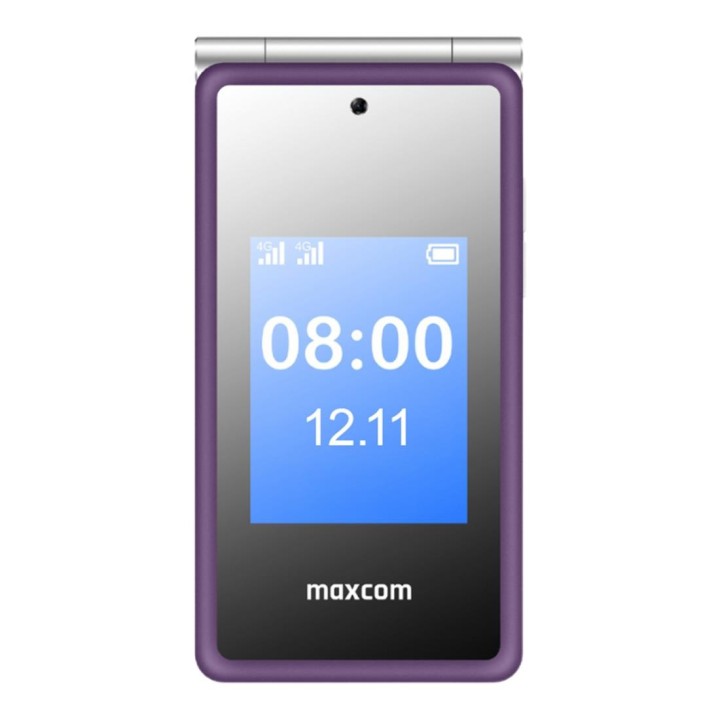
Telefon MaxCom MM 835L 4G purple
Maxcom S.A.
Towarowa 23A 43-100 Tychy Polska
E-mail: office@maxcom.pl
Formularz kontaktowy: https://maxcom.pl/kontakt/
Telefon: +48 32 327 70 89
List of safety warnings for smartphones and mobile phones based on the requirements of Regulation (EU) 2023/988 on General Product Safety (GPSR): 1. Risk of electric shock: * Do not connect or disconnect your smartphone to power with wet hands. * Make sure your hands are dry before operating the charging cable or electrical outlet. 2. Overheating of the device: * Avoid heavy use, such as playing video games for a long time or charging in an enclosed space to prevent overheating. * Do not leave your smartphone in enclosed spaces, e.g. in the car on hot days. * Charge on a stable, hard surface, away from flammable materials. 3. Mechanical damage and cuts: * The fall of a smartphone can cause the screen to shatter, which can lead to cuts. * Use durable protective cases and tempered glass for your screen. * In case of screen damage, discontinue use until repaired. 4. Battery explosion risk: * Damaged or low-quality batteries may explode during charging or heavy use. * Use only original charging accessories. * Avoid exposing your smartphone to impacts and high temperatures. 5. Hazards for children: * Children may accidentally swallow small items such as a SIM card or SIM card tray. * Keep small items and accessories out of reach of children. * Do not allow children to use their smartphone independently without supervision. 6. Effects on eye health: * Long-term use of a smartphone, especially in dark conditions, can lead to eye strain. * Use eye protection mode if available and take breaks from the screen regularly. 7. Use in humid environments: * Contact with water or moisture can damage the device and cause it to malfunction. * Avoid using your smartphone in the bathroom, in the rain, or in other humid environments unless your device is waterproof certified (e.g. IP68). 8. Interference with other devices: * Using a smartphone near medical devices such as pacemakers can cause electromagnetic interference. * Keep a distance of at least 15 cm between your smartphone and medical devices. 9. Fire hazard: * Storing your smartphone near flammable materials or using non-original chargers may increase the risk of fire. * Charge your smartphone away from fabrics, paper, and other flammable materials. 10. Driving safety: * Using your smartphone while driving increases the risk of an accident. * Do not use your smartphone while driving. Use speakerphones or stop in a safe place. 11. Regular maintenance: * Failure to regularly clean ports and sockets can lead to damage or failure. * Clean ports and sockets regularly using a dry and clean cloth, avoiding moisture input.
Produkty, które ostatnio zwróciły Twoją uwagę.