- Nowy
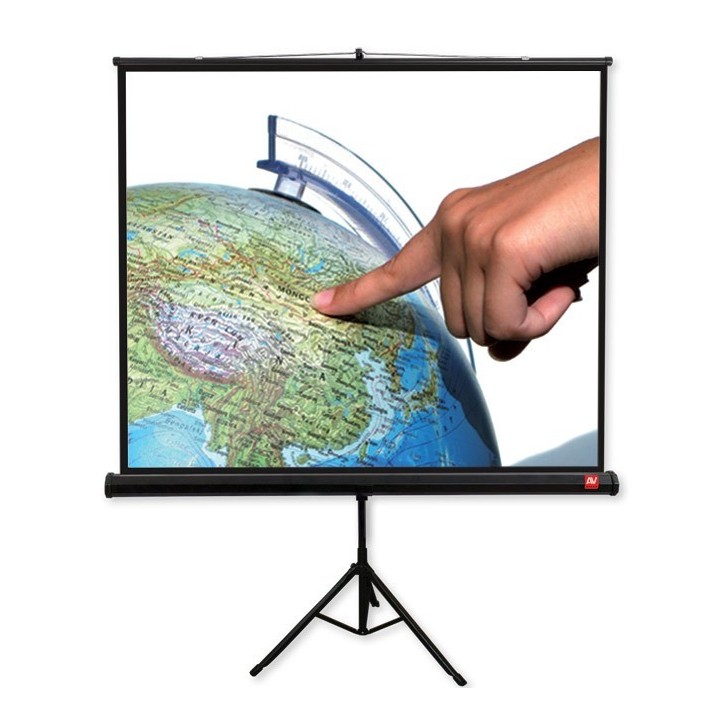
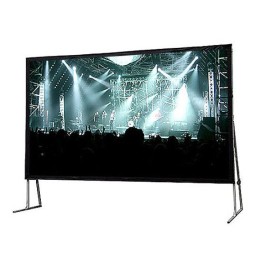
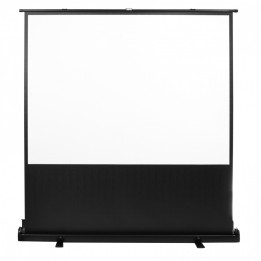
Ekran na statywie Tripod PRO 180 (1:1, 180x180cm, Matt White, czarne ramki) obrazki
Ekran na statywie Tripod PRO 180 (1:1, 180x180cm, Matt White, czarne ramki)
Opis produktu
Ekran na statywie Avtek Tripod PRO 180
Avtek Tripod PRO 180 to ekran na statywie z elegancką, metalową obudową w kolorze czarnym. Posiada ergonomiczny uchwyt do przenoszenia i regulacji wysokości oraz wzmocnione plastikowe końcówki nóżek. Mobilny i łatwy do przechowywania w pozycji pionowej dzięki składanemu trójnogowi. Specjalne ramię do ustawiania ekranu pod odpowiednim kątem eliminuje efekt trapezu. Obsługiwane formaty obrazu to Format 1:1, 4:3, 16:9, 16:10 (regulacja ręczna). Wysokiej jakości powierzchnia projekcyjna ze współczynnikiem odbicia światła 1.0. Czarne ramki boczne zwiększają kontrast oglądanego obrazu. Zastosowany specjalny, wzmocniony trójnóg zwiększający stabilność. Wysokość od podłogi wynosi: 230 cm (min.) - 259 cm (max.)

Specyfikacja
- Rodzaj ekranu projekcyjnego: Rozwijany ręcznie
- Montaż (AGD): Stojący
- Proporcje obrazu: 16:9
- Wymiary ekranu projekcyjnego (a x b): 1800 x 1800 mm
- Wymiary obrazu ekranu projekcyjnego (a x b): 1750 x 1750 mm
- Projekcja (ekrany projekcyjne): Przednia
- Pozostałe parametry: - Elegancka, metalowa obudowa w kolorze czarnym- Ergonomiczny uchwyt do przenoszenia i regulacji wysokości- Mobilny i łatwy do przechowywania w pozycji pionowej dzięki składanemu trójnogowi- Specjalne ramię do ustawiania ekranu pod odpowiednim kątem eliminuje efekt trapezu- Wzmocnione plastikowe końcówki nóżek- Wysokiej jakości powierzchnia projekcyjna ze współczynnikiem odbicia światła 1.0- Czarne ramki boczne zwiększają kontrast oglądanego obrazu- Specjalny, wzmocniony trójnóg zwiększający stabilność- Wysokość od podłogi: 230 cm (min.) - 259 cm (max.)- Czarne ramki boczne: 25 mm- Czarny TOP: 25 mm- Czarny dół: 25 mm- Długość obudowy: 1869 mm- Przekrój kasety: 65 mm- Rodzaj powierzchni: Matt White
- Szczegóły gwarancji: Gwarancja na produkt:3 lata
- Uwaga: CE+WEEE
Szczegóły produktu
- Marka Avtek
- Kod produktu 660fb8b471a267703cab3d4e
- Dostępność 9 Przedmioty
- EAN13 5907731310048
- MPN 1EVT13
Producent
Producent
VIDIS SA
ul. Logistyczna 4 55-040 Bielany Wrocławskie Polska
E-mail: handlowy@vidis.pl
Formularz kontaktowy: https://www.vidis.pl/kontakt
Telefon: +48 71 728 43 06
Bezpieczeństwo
Informacje o bezpieczeństwie
List of projector safety warnings based on the requirements of General Product Safety Regulation (EU) 2023/988 (GPSR): 1. Risk of electric shock: * Make sure the projector is connected to an outlet with grounding. * Do not touch the plug or power cable with wet hands. * Avoid using the projector in damp rooms. 2. Risk of overheating: * Provide adequate ventilation around the projector while maintaining at least 50 cm of free space. * Do not block ventilation openings. * Do not place the projector on soft surfaces such as blankets or pillows. 3. Fire risk: * Use only original chargers and accessories recommended by the manufacturer. * Do not leave the projector on unattended near flammable materials. 4. Risk of eye damage: * Do not look directly into the projector light. * Set the projector at a safe distance from viewers to avoid eye strain. 5. Projector Drop Risk: * Use the projector on a stable surface. * Make sure the ceiling mount is suitable for the weight of the projector and properly mounted. 6. Risk of hearing damage: * Set projector volume to safe. * Avoid prolonged listening to loud noises. 7. Hazards at high temperatures: * Do not expose the projector to direct sunlight. * Avoid using the projector at temperatures above the recommended range. 8. Risk of damage during cleaning: * Before cleaning, disconnect the projector from the power supply and use a soft, slightly damp cloth. * Avoid using strong detergents that can damage the surface of the projector. 9. Caution when replacing accessories: * Use only the accessories recommended by the manufacturer. * If replacing the lamp, follow the manufacturer's instructions and do not expose the lamp to high temperatures. 10. Warnings for children: * Keep power cables out of reach of children. * Make sure your kids don’t play with the projector or accessories that can be dangerous. 11. Transport * Before transportation, make sure the projector cools down and is well packed to avoid mechanical damage. 12. Other hazards: * Do not try to repair the projector yourself. Turn to a qualified service. * Do not use the projector near flammable substances.
Ekrany i akcesoria do projektorów
Ostatnio oglądane
Produkty, które ostatnio zwróciły Twoją uwagę.
- Nowy
- Nowy

- Nowy
- Nowy
- Nowy
- Nowy

- Nowy
- Nowy
- Nowy