- Nowy
HP Klawiatura przewodowa 150 664R5AA obrazki
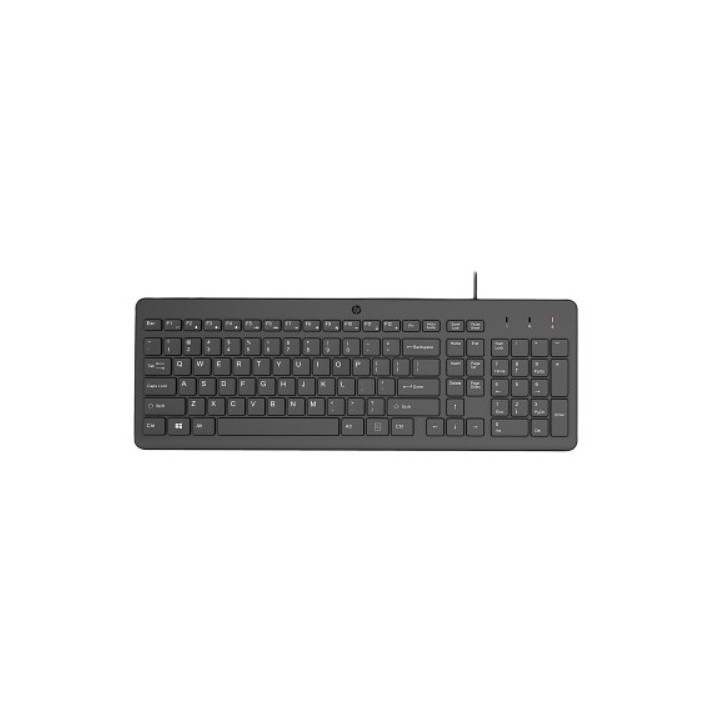
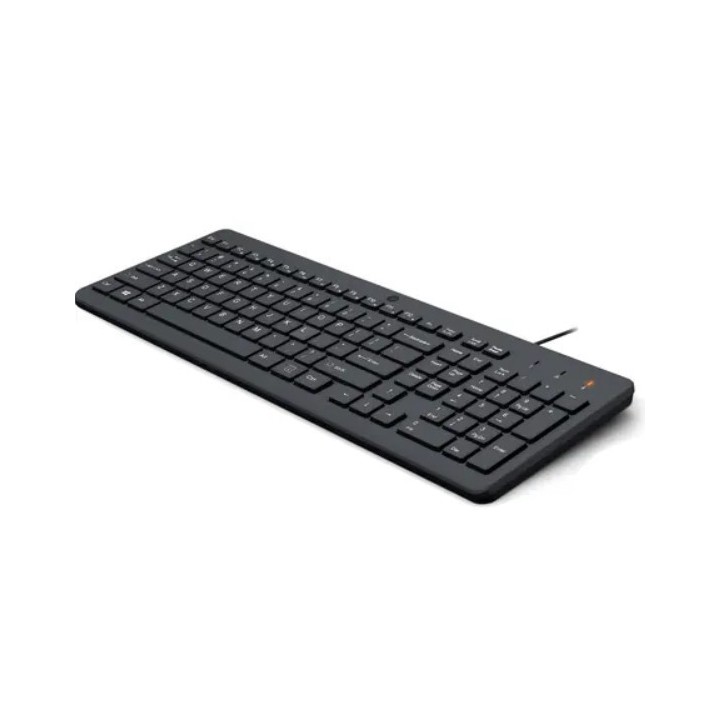
HP Klawiatura przewodowa 150 664R5AA
Opis produktu
Łap i ruszaj w drogę z tym doskonałym towarzyszem plug-in-play – wygodną klawiaturą ze wszystkimi funkcjami, która przyda się wszędzie tam, dokąd zaprowadzi Cię droga.
Ta klawiatura wyspowa ma płaską konstrukcję. Niskoprofilowa konstrukcja sprawia, że naciśnięcia klawiszy są szybkie, wygodne i wystarczająco dokładne.
Często używane funkcje są zintegrowane w 12 kombinacjach skrótów klawiszowych z klawiszem Fn – muzyka, filmy, głośność, strona główna, zakładki i poczta e-mail. Skrót powyżej z prawdziwego zdarzenia.
Dzięki konfiguracji USB typu plug-and-play można szybciej i łatwiej niż kiedykolwiek podłączyć się do komputera i zacząć pisać.
Ta klawiatura została zaprojektowana z myślą o optymalnym komforcie i dopasowaniu do naturalnej pozycji użytkownika, dzięki czemu nadgarstek nie będzie nadwyrężony przez cały dzień.
Specyfikacja
- Opis produktu: HP 150 klawiatura QWERTY Międzynarodowy Angielski urządzenie wejściowe
- Rodzaj urządzenia: Klawiatura
- Interfejs: USB
- Sposób podłączenia: Przewodowa
- Lokalizacja i układ: QWERTY Międzynarodowy Angielski
- Wymiary (szer.głęb.wys.): 42.59 cm x 14.61 cm x 2.68 cm
- Waga: 440 g
- Zaprojektowany dla: Victus by HP Laptop 15, 16; Laptop 14, 15, 15s; Pavilion Plus Laptop 14
Szczegóły produktu
- Marka HP Inc.
- Kod produktu 6610bf32620507cf6ebddba9
- Dostępność 11 Przedmioty
- EAN13 0196548244133
- MPN 664R5AAABB
Specyfikacja
- Układ klawiatury QWERTY
- Podświetlenie klawiatury Nie
- Sposób połączenia Przewodowe
Producent
Producent
HP Inc Polska Sp. z o.o.
ul. Szturmowa 2a 02-678 Warszawa Polska
E-mail: support@hp.com
Formularz kontaktowy: https://www.hp.com/us-en/contact-hp/contact.html
Telefon: +1 650-857-1501
Osoba odpowiedzialna w UE
HP Inc Polska sp. z o.o
Plac marsz. Józefa Piłsudskiego 1 00-078 Warszawa Polska
E-mail: support@hp.com
Bezpieczeństwo
Informacje o bezpieczeństwie
List of keyboard safety warnings based on the requirements of General Product Safety Regulation (EU) 2023/988 (GPSR): * Make sure you use the keyboard as intended, avoid over-pressing or hitting the keys. * Protect your keyboard from flooding with liquids, as this can damage your electronics. * If you are using a wireless keyboard, be sure to replace the batteries regularly and dispose of them as per your regulations. * Keep your keyboard clean, vacuum it regularly, and clean with gentle agents to prevent dust and dirt buildup. * If the keyboard has LED backlighting, avoid staring at intense light for a long time, especially in dark environments. * Store your keyboard in a dry place, away from direct sunlight and heat sources. * Make sure that the keyboard cable is not an obstacle and does not threaten to trip. * If the keyboard has sharp edges, be careful to avoid cuts. * If you experience skin allergies to the materials from which the keyboard is made, stop using it and consult your doctor. * Do not use a damaged keyboard where the keys are loose or missing. * Keep your workstation organized to avoid accidental damage to your keyboard. * Avoid using the keyboard in conditions of high humidity or dustiness, as this can negatively affect its operation. * If you notice the keyboard overheating, disconnect it from the power source immediately. * If the keyboard is equipped with a USB receiver, store it in a safe place to avoid being swallowed by children. * Make sure that children do not play with the keyboard or its elements. * Do not try to repair the keyboard yourself if you are not qualified. * Pay attention to the ergonomics of the work to avoid problems with the wrists and hands during prolonged use of the keyboard.
Klawiatury
- Nowy
- Nowy
- Nowy
- Nowy
- Nowy
- Nowy
- Nowy
- Nowy
Ostatnio oglądane
Produkty, które ostatnio zwróciły Twoją uwagę.
- Nowy
- Nowy

- Nowy
- Nowy
- Nowy
- Nowy
- Nowy
- Nowy
- Nowy
- Nowy
- Nowy