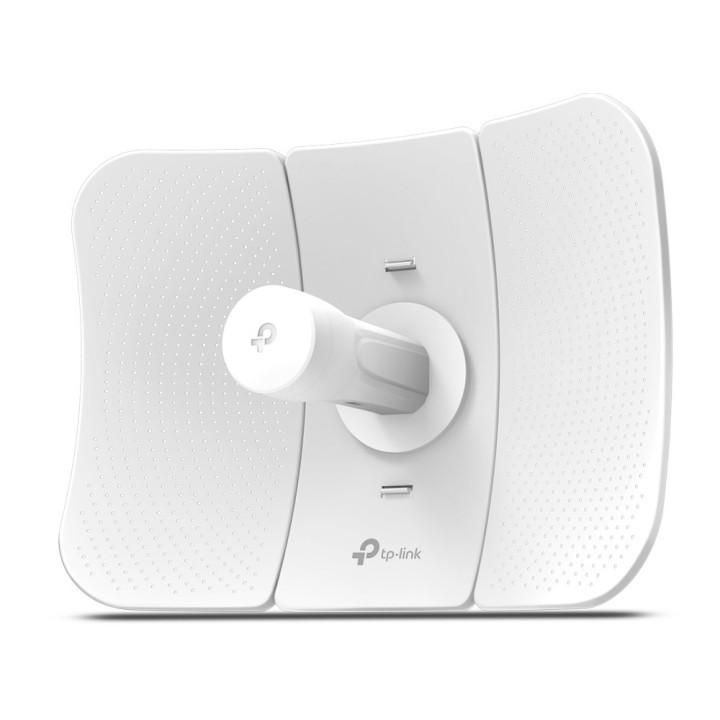
Urządzenie zewnętrzne CPE CPE605 5GHz N150 23dBi

Cena: 284,99 zł
Brutto
Dostępność produktu: Dostępny 2 szt.
Czas dostawy Wysyłka w ciągu 2 dni roboczych
Koszt dostawy Bezpłatna dostawa od 250 zł.

Opis produktu

Zewnętrzne urządzenie CPE 23dBi, 5GHz, 150Mb/s

Kluczowe cechy:

  • Do 150Mb/s prędkości transmisji bezprzewodowej w paśmie 5GHz
  • Kierunkowa antena 23dBi o wysokim zysku z dedykowanym metalowym reflektorem, idealna do transmisji na długie dystanse
  • Precyzyjne kierowanie wiązki, większa odporność na opóźnienia i zakłócenia
  • Innowacyjne elementy zatrzaskowe usprawniają montaż, mocna konstrukcja zapewnia stabilność urządzenia nawet w warunkach silnego wiatru
  • Odporna na warunki środowiskowe obudowa z certyfikatem IP65, ochrona przed wyładowaniami elektrostatycznymi 15KV oraz ochrona przed wyładowaniami atmosferycznymi 6000V
  • Technologia TP-Link Pharos MAXtream TDMA poprawia wydajność przesyłu i zmniejsza opóźnienia w transmisji
  • Centralny system zarządzania - Pharos Control
  • Obsługa pasywnego PoE zapewnia elastyczność rozmieszczenia i prostą instalację urządzenia

Specyfikacja

  • Zakres częstotliwości: 5150 MHz ... 5850 MHz
  • Zysk energetyczny: 23 dBi
  • Polaryzacja: pionowa/pozioma
  • Szerokość wiązki głównej w płaszczyźnie poziomej (H): 7 °
  • Szerokość wiązki głównej w płaszczyźnie pionowej (V): 10 °
  • Moc nadajnika: max. 23 dBm
  • Standardy: IEEE 802.11 a/n
  • Prędkość transmisji: max. 150 Mb/s @ 40 MHz (dynamiczne) max. 72.2 Mb/s @ 20 MHz (dynamiczne) max. 36.1 Mb/s @ 10 MHz (dynamiczne) max. 18.05 Mb/s @ 5 MHz (dynamiczne)
  • Porty LAN: 1 x 10/100 Mbps LAN + PoE, Ekranowany
  • Tryby pracy: WISP, Access Point, Access Point WDS, Klient, Klient WDS, Router lub Bridge, Repeater
  • Zabezpieczenia: WPA/WPA2, WPA-PSK/WPA2-PSK ( TKIP/AES )
  • Interfejs do zarządzania: Przeglądarka www, aplikacja PharOS Control
  • Pamięć: 64MB DDR2, 8MB Flash
  • Procesor: Qualcomm 560MHz, MIPS 74Kc
  • Wybrane cechy: Technologia TP-LINK Pharos MAXtream TDMA Regulowana moc nadajnika Transmisja nawet do 20 km System centralnego zarządzania PharOS Control Wskaźniki jakości sygnału bezprzewodowego Pasmo : 5, 10, 20, 40 MHz Wsparcie dla narzędzi Antenna Alignment (ustawienie anteny), Distance Setting (ustawienie odległości), Ping Watch Dog oraz Wireless Speed Test Multi-SSID WDS filtrowanie adresów MAC ukrycie SSID DDNS SSH Wbudowany watchdog Przycisk RESET
  • Obudowa: Tworzywo sztuczne (PC) Obudowa odporna na warunki pogodowe - IP65
  • Ochrona przeciwprzepięciowa: 15 kV ESD 6 kV wyładowania atmosferyczne
  • Zasilanie PoE: (do 60 m przewodem UTP)
  • Zasilanie: Pasywne PoE 16 V ... 27 V DC (zasilacz w komplecie)
  • Pobór mocy: 6 W
  • Temperatura pracy: -40 °C ... 70 °C
  • Dopuszczalna względna wilgotność otoczenia: 10 % ... 90 %
  • Waga: 0.95 kg
  • Wymiary: 350 x 255 x 207 mm
  • Producent / Marka: TP-LINK
  • Gwarancja: 3 lata

Szczegóły produktu

  • Marka TP-LINK
  • Kod produktu 660fbb9571a267703cb0326b
  • Dostępność 2 Przedmioty
  • EAN13 6935364089887
  • MPN CPE605

Specyfikacja

  • Rodzaj urządzenia Access Point / Punkt dostępowy
  • Generacja Wi-Fi Wi-Fi 4
  • Pasma Wi-Fi 5 GHz
  • Liczba portów LAN (szt.) 1 szt.
  • Zasilanie PoE Tak

Producent

Producent

TP-Link Polska Sp. z o.o.

Ożarowska 40/42 05-850 Duchnice Polska

E-mail: info.pl@tp-link.com

Telefon: +48 22 360 63 63

Osoba odpowiedzialna w UE

TP-Link

Ożarowska 40/42 05-850 Duchnice Polska

E-mail: office.poland@tp-link.com

Telefon: +48 22 360 63 00

Bezpieczeństwo

Informacje o bezpieczeństwie

List of safety warnings for WiFi and Access Point Routers based on the requirements of Regulation (EU) 2023/988 on General Product Safety (GPSR) 1. Risk of electric shock: * Make sure that the device is connected to a working socket with grounding. * Do not touch the plug or cable with wet hands. * Avoid using the device in places with high humidity. 2. Risk of overheating: * Provide adequate ventilation while maintaining at least 5 cm of free space around the device. * Do not block ventilation openings. 3. Fire risk: * Use only original power supplies and accessories recommended by the manufacturer. * Do not leave the device on unattended near flammable materials. 4. Hazards at high temperatures: * Do not expose the device to direct sunlight. * Avoid using the router at temperatures above the recommended range (usually 5-35°C). 5. Risk of damage during cleaning: * Before cleaning, disconnect the device from the power supply and use a soft, slightly damp cloth. * Avoid using strong detergents that can damage the surface of the device. 6. Warnings for children: * Keep power cables out of reach of children. * Make sure that children do not play with the device or accessories that can be dangerous. 7. Regularly check the technical condition of the device: * Check the condition of the device regularly for mechanical damage, cracks or other defects. * Do not use the device if it has visible mechanical damage. 8. Use in humid environments * Avoid using your router in the bathroom, in the rain or in other humid environments 9. Interference with other devices * Using a router near medical devices such as pacemakers can cause electromagnetic interference. * Keep a distance of at least 15 cm between your router and medical devices. 10. Regular maintenance * Failure to regularly clean ports and sockets can lead to damage or failure. * Clean ports and sockets regularly using a dry and clean cloth, avoiding moisture input. 11. Risk of loss of water resistance * Do not immerse in water if it is not waterproof. 12. Electromagnetic interference * Smartwatches can interfere with medical devices such as pacemakers. 13. Small parts: * Components of the device, can be swallowed by children. * Keep your device and its accessories out of reach of children. Do not allow children to use the device themselves without supervision. 14. Risk of battery damage * Improper use, such as overheating or using a non-original charger, can lead to battery damage and, in extreme cases, to battery explosion. * Charge your device at room temperature and use only original accessories. Do not expose your smartwatch to high temperatures. 15. Maintenance and cleaning * Impurities such as sweat or dirt can cause discomfort and damage to materials. * Clean your smartwatch and strap regularly with a soft, damp cloth. Avoid using harsh chemicals.

Ładowanie...
Wróć na górę