- Nowy
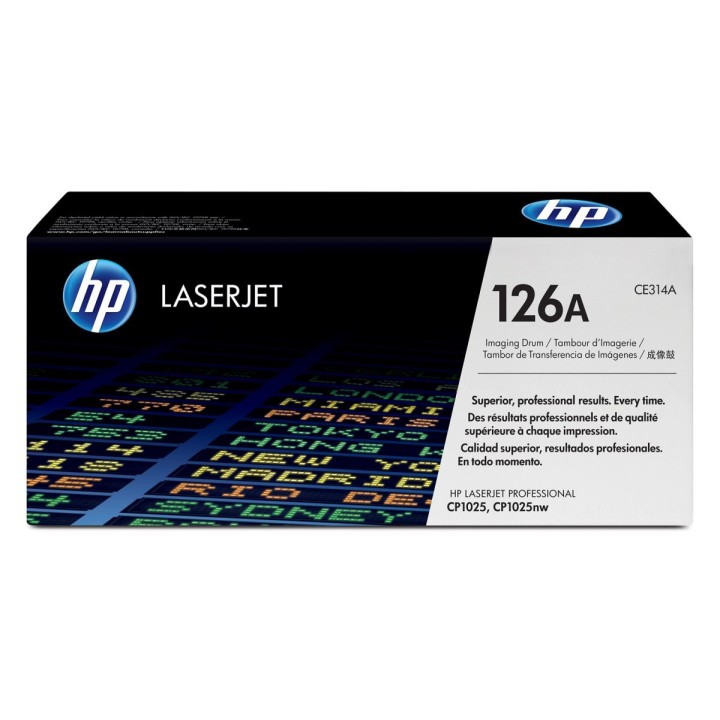
126A CP1025 Bęben obrazowy CE314A obrazki
126A CP1025 Bęben obrazowy CE314A
Opis produktu
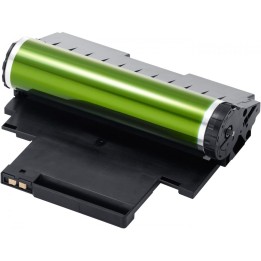
Bębny obrazowe HP 126A LaserJet zapewniają profesjonalny wygląd dokumentów i materiałów marketingowych oraz wydajność pracy w domu i w biurze, ponieważ pozwalają zaoszczędzić czas i materiały eksploatacyjne. To bębny obrazowe stworzone z myślą o niezawodności.
Specyfikacja
- Specyfikacja techniczna: Średnia wydajność bębna - 14000 stron w czerni, 7000 stron w kolorze
- Kolor (mat.eksp.): Czarny (black)
- Rodzaj wkładu: Bęben
- Liczba w opakowaniu jednostkowym: 1
- Kompatybilność (mat.eks.): HP LaserJet Pro CP1025 Color (CE913A) HP LaserJet Pro CP1025nw Color (CE914A) HP LaserJet Pro 100 M175a (CE865A)HP LaserJet Pro 100 M175nw (CE866A)
- Wymiary: Opakowanie 363 x 92 x 160 mm
- Waga: 0.9 kg
- Uwaga: CE+WEEE
Szczegóły produktu
- Marka HP Inc.
- Kod produktu 660fb8bb71a267703cab4f73
- Dostępność 1 Przedmiot
- EAN13 0884962223352
- MPN CE314A
Specyfikacja
- Oryginalność materiału Oryginalny
- Kolor materiału Czarny / Cyjan / Magenta / Żółty
Producent
Producent
HP Inc Polska Sp. z o.o.
ul. Szturmowa 2a 02-678 Warszawa Polska
E-mail: support@hp.com
Formularz kontaktowy: https://www.hp.com/us-en/contact-hp/contact.html
Telefon: +1 650-857-1501
Osoba odpowiedzialna w UE
HP Inc Polska sp. z o.o
Plac marsz. Józefa Piłsudskiego 1 00-078 Warszawa Polska
E-mail: support@hp.com
Bezpieczeństwo
Informacje o bezpieczeństwie
List of printer and scanner drum safety warnings based on the requirements of General Product Safety Regulation (GPSR) 2023/988 * Make sure the drum is compatible with your printer or scanner model. The wrong drum can damage the device. * Do not touch the surface of the drum. This can affect the print quality and life of the drum. * Replace the drum according to the manufacturer's instructions. Incorrect installation may cause damage to the printer. * Protect the drum from direct sunlight and high humidity. This can shorten its lifespan. * Do not use damaged drum. This can affect the quality of the print and damage the printer. * Keep the drum out of reach of children. The danger of swallowing small parts. * Use the drum as intended. Do not attempt to modify it or use it for other purposes. * Do not open or disassemble the drum. It contains substances that can be harmful to health. * If the substance from the drum comes into contact with the skin or eyes, immediately wash it with plenty of water and consult a doctor. * Recycle the used drum in accordance with local regulations. Do not throw it into ordinary waste. * Do not expose the drum to extreme temperatures. This can affect its performance and shorten its lifespan. * Use only recommended cleaning products to clean printer components that may come into contact with the drum. Strong detergents can damage it. * Regularly check the condition of the drum. If you notice any damage, replace it immediately. * If the printer displays an error message related to the drum, immediately check its status and correctness of installation. * When replacing the drum, make sure the printer is off power. This will minimize the risk of electric shock. * After replacing the drum, make sure all printer covers and protections are properly mounted. * If you have any doubts about the use of the drum, please contact the technical service of the printer manufacturer. * When cleaning the printer, avoid direct contact of cleaning agents with the drum surface.
Bębny i taśmy barwiące
- Nowy
- Nowy
- Nowy
- Nowy
- Nowy
- Nowy

- Nowy
- Nowy