- Nowy
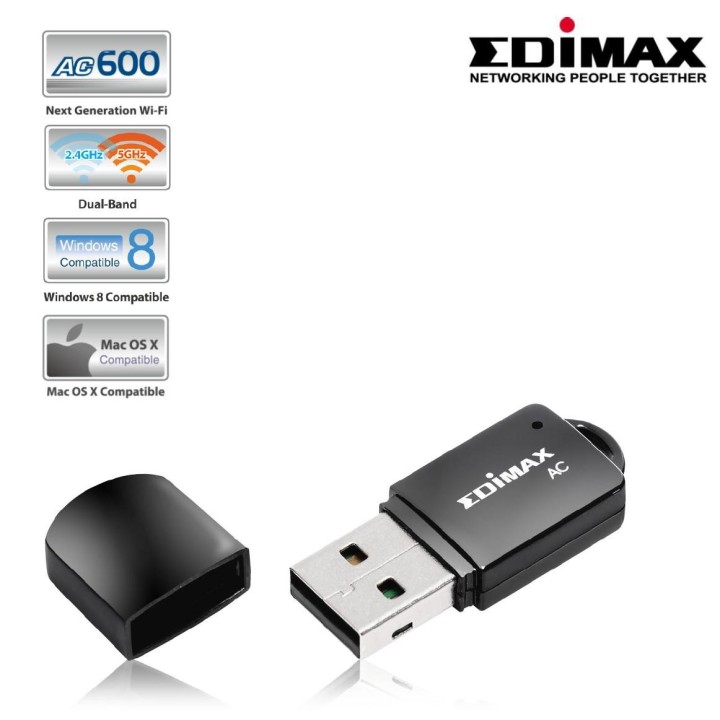
Bezprzewodowy dwupasmowy adapter Mini USB EW-7811UTC obrazki
Bezprzewodowy dwupasmowy adapter Mini USB EW-7811UTC
Opis produktu
Bezprzewodowy dwupasmowy adapter Mini USB
Uaktualnij swoje urządzenie bezprzewodowe do dwuzakresowego 802.11ac z najszybszą możliwą łącznością USB 2.0, aby uzyskać niesamowitą prędkość Wi-Fi w wolnym od zakłóceń paśmie częstotliwości 5GHz. EW-7811UTC to bezprzewodowa karta sieciowa nowej generacji zgodna ze standardem 802.11ac i oferująca prędkość transmisji do 433Mb/s w paśmie 5GHz, prawie 3 razy większą niż standard 802.11n. Wzbogać profesjonalne ekrany wielkoformatowe serii 40, 42 i 46 o superszybkie Wi-Fi 802.11ac i ciesz się transmisją wideo i danych. Wbudowany przycisk WPS (Wi-Fi Protected Setup) pozwala na szybkie połączenie z instniejącą już siecią bezprzewodową. Wystarczy przycisnąć przycisk WPS na urządzeniu oraz na routerze bądź punkcie dostępu.
Specyfikacja
- Typ karty sieciowej: WiFi
- Interfejs: USB
- Pasma (sieci drobne): 2,4 GHz
- Standardy sieciowe: 802.11n
- Antena (sieci drobne): Wewnętrzna
- Obsługiwane systemy operacyjne: Linux
- Wymiary: 35 x 15 x 6 mm
- Pozostałe parametry: Certyfikaty: CE, FCC-B
- Uwaga: CE+WEEE
Szczegóły produktu
- Marka EDIMAX
- Kod produktu 660fc10371a267703cb75c7a
- Dostępność 1 Przedmiot
- EAN13 4710700929766
- MPN EW7811UTC
Specyfikacja
- Interfejs do komputera USB 2.0
- Rodzaj urządzenia Bezprzewodowe
- Generacja Wi-Fi Wi-Fi 5
- Antena zewnętrzna Nie
Producent
Producent
Edimax Technology Europe B.V.
Fijenhof 2 5652 AE Eindhoven NETHERLANDS
E-mail: sales@edimax.nl
Formularz kontaktowy: https://www.edimax.com/edimax/form/contact_us/data/edimax/global/contact_us/
Telefon: +31 40 250 1200
Osoba odpowiedzialna w UE
Edimax Technology Europe B.V.
Fijenhof 2 5652 AE Eindhoven NETHERLANDS
E-mail: sales@edimax.nl
Formularz kontaktowy: https://www.edimax.com/edimax/form/contact_us/data/edimax/global/contact_us/
Telefon: +31 40 250 1200
Bezpieczeństwo
Informacje o bezpieczeństwie
List of Wi-Fi network adapter security warnings based on the requirements of General Product Safety Regulation (GPSR) 2023/988: 1. Risk of electric shock: * Make sure the device is disconnected from power before installation or disassembly. * Do not touch the metal parts of the network card while the computer is running. * Avoid using the network card in humid environments. 2. Risk of equipment damage: * Install the network card according to the manufacturer's instructions. * Make sure your computer is turned off before installing or disassembling the card. * Do not bend or bend the network card during installation. * Protect your card from electrostatic discharge (ESD). 3. Risk of overheating: * Ensure adequate ventilation inside the computer case. * Do not block the ventilation holes of the network card. 4. Risk of interference: * Keep your network card away from sources of electromagnetic interference (e.g. microwave ovens, cordless phones). * Use shielded antenna cables. 5. Health risks: * Limit long-term exposure to electromagnetic radiation. * Maintain a safe distance from the network card antenna. 6. Data security risks: * Secure your Wi-Fi network with a strong password. * Use WPA3 encryption. * Update your network adapter software. * Use a firewall. 7. Risk of fire: * Do not place the network card near heat or fire sources. * Use only power supplies that comply with your computer specifications. 8. Risk of ingestion: * Keep small network card components (e.g. screws) away from children. 9. Risk of injury: * Beware of sharp edges during installation. 10. Cleaning risk: * Disconnect the card from the power supply before cleaning. * Use a dry, soft cloth. * Do not use detergents or solvents. 11. Risk of hearing damage: * Sound signals emitted by the card set at a safe level.
Karty sieciowe i adaptery Bluetooth
- Nowy
- Nowy
- Nowy
- Nowy
- Nowy
- Nowy
- Nowy
- Nowy
Ostatnio oglądane
Produkty, które ostatnio zwróciły Twoją uwagę.
- Nowy
- Nowy
- Nowy
- Nowy