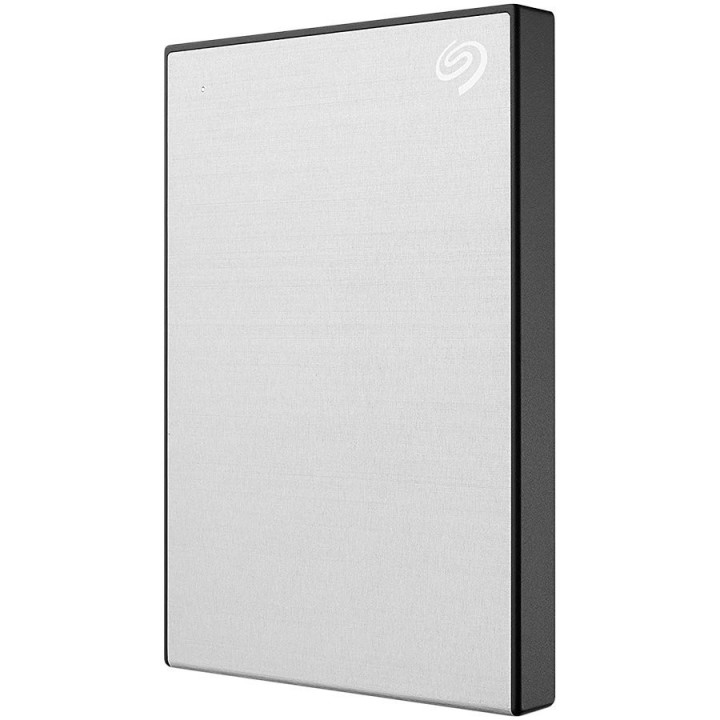
Dysk One Touch 1TB 2,5 STKY1000401 srebrny

Cena: 475,99 zł
Brutto
Dostępność produktu: Dostępny 4 szt.
Czas dostawy Wysyłka w ciągu 2 dni roboczych
Koszt dostawy Bezpłatna dostawa od 250 zł.

Opis produktu

Store and access photos and files on the go with Seagate One Touch HDD. Featuring quick plug-and-play USB 3.0 connectivity to Windows, Mac, or Chromebook, consolidate files with a single click or schedule automatic daily, weekly or monthly backups. Plus — edit, manage, and share photos with a one-year complimentary subscription to Mylio Create and a four-month membership to Adobe Creative Cloud photography plan.

Big Things Come in Small Packages
We can all use some extra space. To store our digital content, that is. That’s why we designed the One Touch family — premium, high-capacity HDDs, SSDs, and hubs to help you manage your digital world with ease and confidence. Durable and dependable, keep your content with you so it’s ready to access — whenever you need it — with our ultra-small, portable HDDs and SSDs. Or backup files AND charge multiple devices simultaneously with the password-protected hub in abundant capacities.

Measurably Small. Amazingly Fast.
Accelerate your performance and score some downtime with One Touch SSD. With speeds up to 1,030 MB/s to transfer large files without delay, an Android app to backup photos and videos — freeing up device space, plus up to 2 TB capacity and simple plug-n-play USB-C compatibility with Windows, Mac, and Chromebook to keep files handy. Travel-sized and styled right, work seamlessly from the drive — wherever you are.

An External SSD Outfitted for Android
With One Touch SSD, backup your Android’s videos, photos, and more and free up extra space on your device! Featuring USB-C connectivity and our new Android backup app (download via the Google Play Store). Transfers are quick and easy, and OneTouch SSD is perfect for taking your content on the go. Click here for a list of devices that have been factory-tested for compatibility.

High Capacity. Stellar Style.
Refined and understated. Cosy and textured. One Touch comes in an array of styles and capacities made to complement your signature look. And whether you’re storing yearly tax documents or ever-growing collections of high-res photos, capacity won’t be an issue.

Make Your To-Do List Easier
Life’s busy, and backing up digital memories is always on the to-do list. Check it off — with One Touch Hub. Password-protected storage with a front-facing USB-C and USB 3.0 port to backup AND charge multiple devices, Windows®/Mac compatibility, and capacities that store countless photos.

Advance Data Encryption
Need a hard drive that goes above and beyond the call of duty? Opt for One Touch HDD or One Touch Hub with data security. Thanks to its password protection and AES-256 hardware encryption — the same standard used by the U.S. government and global intelligence agencies — you can rest easy knowing your digital life is secure.

Convenient Backup
With One Touch SSD you can sync folders for seamless file management, and get the effortless file protection of Sync Plus software. With One Touch HDD and One Touch HDD with password, schedule automatic hourly, daily, weekly, or monthly backups to keep all your files consolidated into one place. Whatever your backup style, One Touch offers an easy-to-use solution for you.

Dropbox Backup Plan
Automatically back up one computer and one external drive with a 6-month free trial of the Dropbox Backup plan. Keep a copy of your files in the cloud and quickly restore any accidentally deleted data.

Control Your Content with Mylio Photos
Organise, declutter, and enhance your photos and videos with a 6-month complimentary subscription to Mylio Photos plan. Bring your scattered media together in one library that’s private and protected — and easily preserve family memories for generations to come.

We’ve Got Your Back
When the unexpected happens — like water damage or natural disaster — Rescue Services help you defend against data loss and retrieval costs so you can rest easier.

Specyfikacja

  • HDD capacity: 1000 GB
  • HDD size: 2.5 "
  • Thunderbolt technology: No
  • USB version: 2.0/3.2 Gen 1 (3.1 Gen 1)
  • Ethernet LAN: No
  • USB connector: Micro-USB B
  • Wi-Fi: No
  • Product colour: Silver
  • Windows operating systems supported: Yes
  • Mac operating systems supported: MacOS
  • Housing material: Aluminium
  • Password protection: Yes
  • Hardware encryption: Yes
  • Bus powered: USB
  • Depth: 11.7 mm
  • Width: 78 mm
  • Height: 114.8 mm
  • Weight: 148 g
  • Cables included: Micro-USB
  • User guide: Yes
  • Package weight: 233 g
  • Package width: 106 mm
  • Package height: 146 mm
  • Package depth: 37.5 mm

Szczegóły produktu

  • Marka Seagate
  • Kod produktu 660fc5fc71a267703cbc457a
  • Dostępność 4 Przedmioty
  • EAN13 3660619041602
  • MPN STKY1000401

Specyfikacja

  • Pojemność nośnika (GB) 1000 GB

Producent

Producent

Seagate Technology (Netherlands) B.V.

Tupolevlaan 105 1119 PA Schiphol-Rijk Holandia

Formularz kontaktowy: https://www.seagate.com/em/en/contacts/

Bezpieczeństwo

Informacje o bezpieczeństwie

List of external and portable drive safety warnings based on the requirements of General Product Safety Regulation (GPSR) 2023/988: * Use the drive according to the manufacturer’s instructions to avoid mechanical damage or data loss. * Do not expose the disc to extreme temperatures, moisture, or direct sunlight to prevent overheating or damage. * Protect your drive from drops and bumps, as this can cause damage to internal components and data loss. * Disconnect the drive from your computer in a secure manner (using the "Safe Hardware Removal" feature) to avoid data loss or damage to the drive. * Do not open the disk housing, as this may result in loss of warranty and damage to delicate components. * In case of disk failure, do not try to repair it yourself; contact a professional data recovery service. * Keep the drive away from strong magnetic fields that can disrupt operation and cause data loss. * Use only the original cables and power supplies that came with the drive to avoid compatibility issues and damage. * Regularly back up data from disk to other media to avoid losing important information in the event of a failure. * Keep the disc out of reach of children to avoid accidental damage or ingestion of small items. * When transporting the disk, protect it from shocks and moisture by placing it in a suitable protective case. * Do not attempt to connect a damaged drive to your computer as this may cause additional problems. * Regularly scan the drive with an antivirus program to prevent malware infection. * Do not use the disc near flammable substances, as overheating and fire may occur in the event of a breakdown. * Make sure the voltage in the electrical outlet complies with the requirements of the disk power supply to avoid damage. * If the drive overheats, disconnect it from power immediately and let it cool before reusing. * Clean the disc housing with a soft, dry cloth; do not use chemicals that can damage the surface. * For long-term disk storage, place it in a dry and cool place to avoid component degradation. * If your drive is equipped with encryption software, make sure your password is secure and remembered to avoid permanent loss of access to your data. * When connecting and disconnecting the drive, hold by the housing, not by the cable, to avoid damaging the connector.
Ładowanie...
Wróć na górę