- Nowy
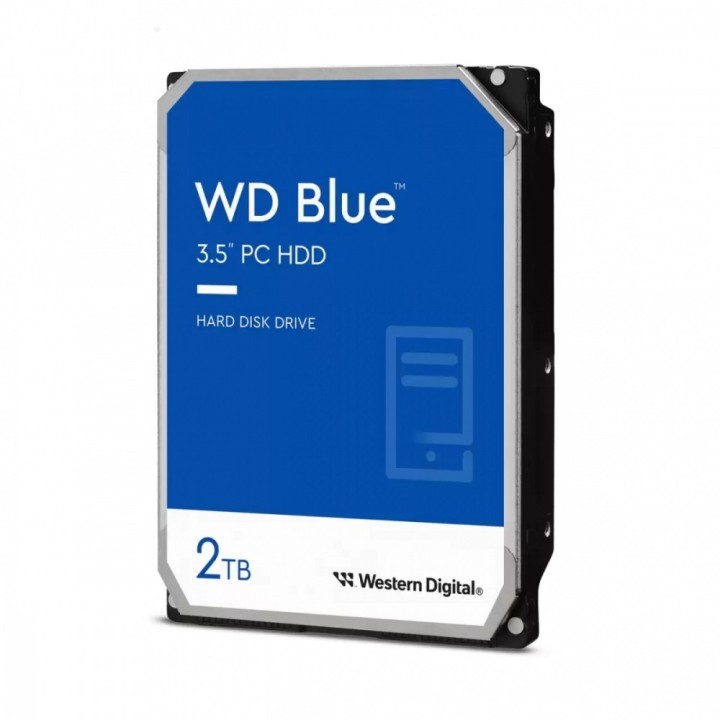
Dysk twardy WD Blue 2TB 3,5 64MB SATAIII 5400 RPM obrazki
Dysk twardy WD Blue 2TB 3,5 64MB SATAIII 5400 RPM
Opis produktu
WD Blue
Wyższa jakość magazynowania
Powiększ pojemność pamięci swojego komputera PC, korzystając z dysków WD Blue i szeregu dostępnych opcji. Produkty tej marki są zalecane do stacjonarnych komputerów PC i komputerów typu all-in-one.
Zwiększenie wydajności komputera PC
Zwiększ wydajność i pojemność swojego komputera stacjonarnego. Połącz swój dysk twardy z dyskiem SSD, aby osiągnąć maksymalną prędkość dostępu do danych. Dysk WD Blue zapewni nawet 6 TB dodatkowej pojemności.
Zabezpiecz się na przyszłość
Nowoczesna technologia wymaga więcej pamięci. Kamery nagrywające filmy w rozdzielczości 4K z szybkością 30 kl/s wymagają dużej ilości pamięci. Dla naszego dysku o pojemności 6 TB obsługa tych wszystkich multimediów to pestka.
Zaufaj marce WD
Każdy dysk WD Blue został zaprojektowany, przetestowany i wyprodukowany z myślą o niezawodności i trwałości oraz jest objęty 2-letnią ograniczoną gwarancją.
Łatwe sporządzanie kopii zapasowej i aktualizacja
Dostępne za darmo oprogramowanie Acronis True Image WD Edition pozwala wykonać kopię zapasową systemu operacyjnego, aplikacji, ustawień i wszystkich danych zapisanych na dysku.
Technologia pomagająca chronić dane
Technologia NoTouch Ramp Load głowica dysku jest umieszczana w bezpiecznej pozycji w celu ochrony danych.
Specyfikacja
- Model: WD Blue
- Typ dysku: HDD
- Format szerokości dysku: 3,5'' (LFF)
- Typ napędu: Wewnętrzny
- Pojemność dysku: 2 TB
- Interfejs dysku: SATA III - 6 Gb/s
- Prędkość obrotowa: 5400 obr/min
- Bufor: 64 MB
- Poziom hałasu: 26 dB
- Kolor (wyliczeniowy): Nie dotyczy
- Wysokość: 26.1 mm
- Szerokość: 101.6 mm
- Głębokość: 147 mm
- Waga: 450 g
- Uwaga: CE+WEEE
Szczegóły produktu
- Marka Western Digital
- Kod produktu 660fc71171a267703cbd3016
- Dostępność 50 Przedmioty
- EAN13 0718037900667
- MPN WD20EARZ
Specyfikacja
- Pojemność nośnika (GB) 2000 GB
- Format dysku 3,5 cala
- Pamięć podręczna dysku (MB) 64 MB
- Prędkość obrotowa (obr/min) 5400 obr/min
- Technologia zapisu CMR
Producent
Producent
Western Digital Corporation
PO Box Address: BP 80006 92135 Issy les Moulineaux FRANCE
E-mail: support@wdc.com
Formularz kontaktowy: https://www.westerndigital.com/support?hideinterst
Telefon: 855-493-7867
Bezpieczeństwo
Informacje o bezpieczeństwie
List of HDD security warnings based on the requirements of General Product Safety Regulation (EU) 2023/988 (GPSR): 1. Protection against mechanical damage: * I am aware that HDDs are sensitive to shocks and drops. Avoid exposing them to such situations, as they can lead to data loss or damage to the drive itself. * I secure the HDD during transport using appropriate shock-absorbing materials. 2. Protection against moisture and extreme temperatures: * I avoid storing and using HDDs in places with high humidity or extreme temperatures, as this can negatively affect their performance and durability. * I make sure the HDD is stored in a dry and cool place when not in use. 3. Correct connection and disconnection: * I connect and disconnect HDDs according to the manufacturer's instructions to avoid damaging the connectors or electronics of the drive. * I always disconnect the HDD from power before disconnecting it from my computer or other device. 4. Secure data formatting and deletion: * I use appropriate tools and methods to format and delete data from HDDs to prevent unauthorized access to sensitive information. * I am aware that simply deleting files does not guarantee permanent deletion of data and I may need specialized software to permanently delete data. 5. Compatibility and power supply: * I make sure the HDD is compatible with my computer system and has adequate power supply. * I use a power supply with adequate power and voltage to ensure stable HDD performance. 6. Caution when opening the enclosure: * I do not open the HDD enclosure unless I am entitled to do so and have the appropriate tools and knowledge. Opening the case may result in loss of warranty and damage to the drive. 7. Overload protection: * I avoid overloading the HDD by regularly deleting unnecessary files and data to ensure its efficient operation. 8. Disposal: * Dispose of used HDDs in accordance with local environmental regulations to prevent contamination and unauthorized access to data. 9. Protection against electromagnetic interference: * I avoid placing HDDs near strong sources of electromagnetic interference that can negatively affect their performance. * I protect the HDD from contact with magnets. 10. Regular backup: * I create regular backups of important data stored on HDDs to prevent data loss in the event of a disk failure.
Dyski HDD
- Nowy
- Nowy
- Nowy
- Nowy
- Nowy
- Nowy
- Nowy
- Nowy
Ostatnio oglądane
Produkty, które ostatnio zwróciły Twoją uwagę.
- Nowy
- Nowy
- Nowy
- Nowy
- Nowy
- Nowy
- Nowy