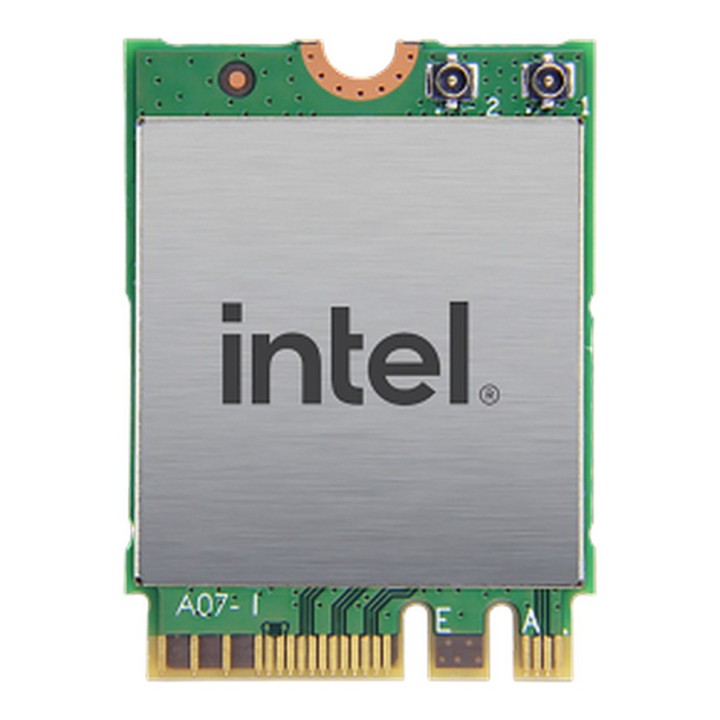
INTEL NIC WI-FI 6 AX200 2230 2x2 AX+BT No vPro

Cena: 98,49 zł
Brutto
Dostępność produktu: Dostępny 200 szt.
Czas dostawy Wysyłka w ciągu 3 dni roboczych
Koszt dostawy Bezpłatna dostawa od 250 zł.

Opis produktu

Rozwiązania Intel Wi-Fi 6 zapewniają największą szybkość komunikacji bezprzewodowej w komputerach, szybsze działanie oraz większe bezpieczeństwo i niezawodność, zwłaszcza w środowiskach o dużej gęstości.

Specyfikacja

  • Opis produktu: Intel WiFi 6 AX200 adapter sieciowy M.2 2230 M.2 1216
  • Rodzaj urządzenia: Adapter sieciowy
  • Typ obudowy: Karta wkładana do gniazda
  • Typ interfejsu (szyny): M.2 2230 M.2 1216
  • Waga: 2.33 g
  • Protokół komunkacyjny danych: Bluetooth 5.0, 802.11ax
  • Pasmo częstotliwości: 2.4 GHz, 5 GHz
  • Zgodność z normami: Bluetooth 5.0, IEEE 802.11ax, WiFi CERTIFIED 6
  • Wymagania systemowe: Linux, Google Chrome OS, Windows 10 64bit Edition

Szczegóły produktu

  • Marka Intel
  • Kod produktu 660ff8e471a267703cd87918
  • Dostępność 200 Przedmioty
  • EAN13 0675901715744
  • MPN AX200NGWGNV

Specyfikacja

  • Wersja Bluetooth 5

Producent

Producent

Intel Polska Sp. z o.o.

Słowackiego 173 80-298 Gdańsk Polska

E-mail: media@asus.com

Formularz kontaktowy: https://www.intel.com/content/www/us/en/support/co

Bezpieczeństwo

Informacje o bezpieczeństwie

List of network card security warnings based on the requirements of General Product Safety Regulation (GPSR) 2023/988: * Make sure that the installation of the network adapter complies with the manufacturer’s instructions. Incorrect installation can lead to damage to your device or computer. * Before installing or disassembling the network card, turn off the computer and disconnect it from power. * Protect your network card from moisture and extreme temperatures. Do not use it in places where it may be exposed to water or direct sunlight. * Use the network adapter for its intended purpose. Do not try to modify or repair it on your own. * Regularly check that the network card is properly attached to the motherboard slot. A loose connection can cause network problems. * Make sure your network adapter drivers are up to date. Outdated drivers can lead to compatibility and security issues. * Use a dry, soft cloth when cleaning the network card. Avoid using cleaning products that can damage components. * If your network card has an antenna, make sure it is properly attached and undamaged. A damaged antenna can affect signal quality. * Pay attention to sharp edges or card components that may pose a potential injury hazard during installation or disassembly. * If your network card has electronic components, keep it away from children.

Ładowanie...
Wróć na górę