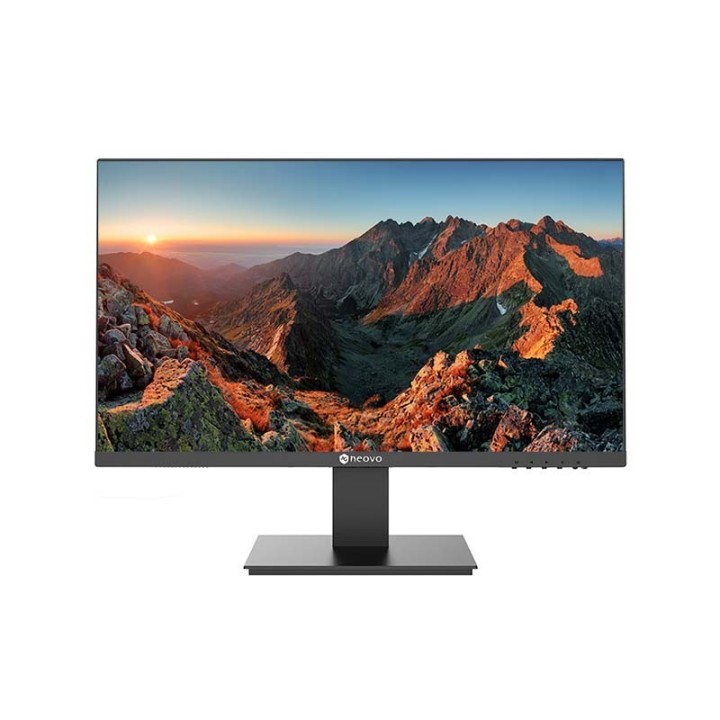
Monitor 23.8 cala LA-2403 IPS FHD 100Hz HDMI DP VGA
Opis produktu
AG NEOVO MONITOR LED LA-2403 BEZ MIGOTANIA, HDMI,DP,VGA
LA-2403
Specyfikacja
Pozycjonowanie na rynku
Biuro
Kolor produktu
Czarny
Odłączana podstawa
Tak
Konstrukcja bezramkowa
Tak
Kolor nóżek
Czarny
Pobór mocy w trybie czuwania
0,5 W
Skala efektywności energetycznej
Od A do G
Napięcie wejściowe AC
100 - 240 V
Tryb wyłączenia
0,3 W
Częstotliwość wejściowa AC
50/60 Hz
Zużycie energii (SDR) na 1000 godzin
14 kWh
Klasa efektywności energetycznej (SDR)
D
Szerokość urządzenia (z podstawą)
541,9 mm
Wysokość urządzenia (z podstawą)
424,2 mm
Szerokość (bez podstawy)
541,9 mm
Głębokość (bez podstawy)
48,2 mm
Waga (z podstawą)
3,3 kg
Waga (bez podstawy)
2,8 kg
Głębokość urządzenia (z podstawą)
180,8 mm
Wysokość (bez podstawy)
322,3 mm
Zakres wilgotności względnej
20 - 85%
Zakres temperatur (przechowywanie)
-20 - 60 °C
Zakres temperatur (eksploatacja)
0 - 40 °C
Dopuszczalna wilgotność względna
5 - 95%
Technologia eliminująca migotanie obrazu
Tak
Filtr światła niebieskiego
Tak
Przewody
HDMI
Przewody
Kabel zasilający
Skrócona instrukcja obsługi
Tak
Kąt widzenia (pionowy)
178°
Kolory wyświetlacza
16.7 miliona kolorów
Technologia wyświetlacza
LCD
Kąt widzenia w poziomie
178°
Zasięg skanowania w poziomie
30 - 113 kHz
Zasięg skanowania (długość)
48 - 100 Hz
Typ matrycy
IPS
Przekątna ekranu
23,8"
Rozdzielczość
1920 x 1080 px
Jasność wyświetlacza (typowa)
250 cd/m²
Czas odpowiedzi (typowy)
5 ms
Współczynik kontrastu (dynamiczny)
20000000:1
Kształt ekranu
Płaski
Typ HD
Full HD
Ilość głośników
2
Wbudowane głośniki
Tak
Moc wyjściowa (RMS)
2 x 1 W
Interfejs do montażu panelu
75 x 75
Regulacja pochylenia
Tak
Standard VESA
Tak
Zakres kąta nachylenia
-5 - 20°
Kensington Lock
Tak
Wersja HDMI
1.4
Ilość portów HDMI
1
Liczba portów VGA (D-Sub)
1
Wejśćie 3,5 mm
Tak
Ilość DisplayPort
1
HDMI
Tak
Wersja DisplayPort
1.2
Certyfikaty zgodności
CE
Certyfikaty zgodności
Federalna Komisja Łączności (FCC)
Certyfikaty zgodności
RoHS
Certyfikaty zgodności
EAC
Certyfikaty zgodności
REACH
Certyfikaty zgodności
WEEE
Certyfikaty zgodności
Dyrektywa niskonapięciowa (LVD)
Certyfikaty zgodności
ICES-003
Kod Europejskiego Rejestru Produktów na potrzeby Etykietowania Energetycznego (EPREL)
1923265
Zgodność z zasadami zrównoważonego rozwoju
Tak
Szerokość
605mm
Długość
120mm
Wysokość
405mm
Parametry
- Przekątna ekranu: 23,8"
- Rozdzielczość: 1920 x 1080 px

Szczegóły produktu
- Marka AG NEOVO
- Kod produktu 682fdbc4417c6945fa507ed2
- Dostępność 30 Przedmioty
- EAN13 4710739598292
- MPN LA-2403
Specyfikacja
- Przekątna ekranu (cal) 23,8 cal
- Rozdzielczość natywna 1920 × 1080
- Typ matrycy IPS
- Częstotliwość odświeżania (Hz) 100 Hz
- Ekran dotykowy Nie
- Zakrzywiony ekran Nie
- Standard VESA 75 × 75
- Pivot Nie
Producent
Producent
AG Neovo
Max Euwelaan 61 4751 Oud Gastel Holandia
E-mail: jeffrey.yu@agneovo.com
Formularz kontaktowy: https://www.agneovo.com/pl/contact
Telefon: +31-10-264-2658
Osoba odpowiedzialna w UE
AG Neovo Technology B.V.
Molenbaan 9 2908 LL Capelle aan den IJssel Holandia
E-mail: jeffrey.yu@agneovo.com
Formularz kontaktowy: https://www.agneovo.com/pl/contact
Telefon: +31-10-264-2658
Bezpieczeństwo
Informacje o bezpieczeństwie
List of computer monitor safety warnings based on the requirements of General Product Safety Regulation (EU) 2023/988 (GPSR): * Risk to vision: Long-term gazing at the monitor screen may cause eye strain, dry eyes or headaches. * Limit the working time with the monitor. * Take regular breaks. * Maintain proper distance from the screen. * Ensure proper lighting in the room. * Set the brightness and contrast of the monitor to a comfortable level. * Ergonomics: Incorrect position when working with the monitor can lead to back, neck, and shoulder pain. * Set the monitor to the correct height so that the top edge of the screen is at eye level or slightly below. * Use an adjustable chair and desk to ensure an ergonomic position. * Maintain proper posture while sitting. * Risk of electric shock: Improper use or damage to the monitor can lead to electric shock. * Do not use the monitor in humid environments. * Do not touch the monitor with wet hands. * Do not put any items inside the monitor. * If the power cable is damaged, replace it with a new one. * Disconnect the monitor from power before cleaning. * Fire risk: Overheating or short circuiting in the monitor can cause a fire. * Do not cover the ventilation holes of the monitor. * Do not place the monitor near heat sources. * Use only the original power supply that came with your monitor. * If the monitor overheats, disconnect it from power immediately. * Mechanical damage: The fall of the monitor can cause damage and pose a threat to the user. * Set the monitor on a stable surface. * Secure cables to avoid accidental tripping. * For monitor transport, use appropriate protective packaging. * Cleaning: Improper cleaning of the monitor can damage the screen or cause other problems. * Use only a soft, dry cloth to clean the screen. * Do not use cleaning products containing alcohol, ammonia or other corrosive substances. * Disconnect the monitor from power before cleaning. * Disposal: Incorrect disposal of the monitor can pose a threat to the environment. * Return the used monitor to the e-waste collection point. * Do not throw the monitor in a regular trash can. * Children: The monitor is not a toy and should not be used by children without supervision. * Make sure children do not touch the power cables. * Make sure kids don't play around with the monitor packaging. * Repairs: Do not try to repair the monitor yourself. * Any repairs should be done by qualified personnel. * Monitor portability: Be careful when moving your monitor. * Disconnect all cables before moving. * Use appropriate packaging. * Weather conditions: Do not expose the monitor to extreme temperatures or moisture. * Protect your monitor from direct sunlight. * Adjustable settings: Do not use extreme brightness or contrast settings. * These can cause faster eye strain. * Noise: If the monitor makes disturbing noises, turn it off immediately. * Contact the technical service. * Environmental protection: Be sure to turn off the monitor when not in use. * You save energy this way. * Software: Use only the software provided by the manufacturer. * You will avoid compatibility issues.
Monitory
Ostatnio oglądane
Produkty, które ostatnio zwróciły Twoją uwagę.