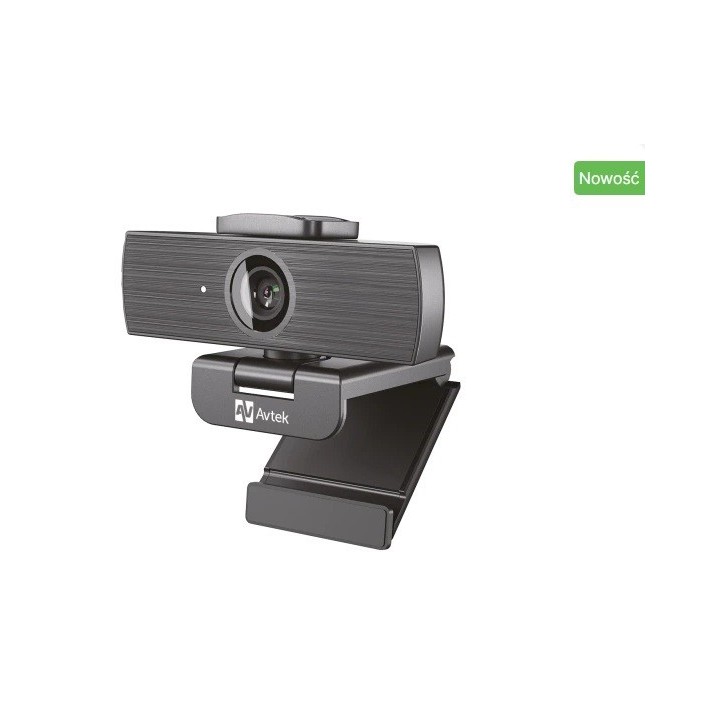
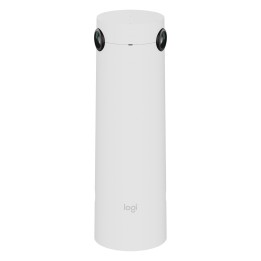
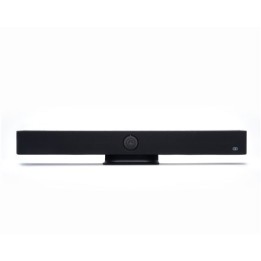
Kamera internetowa Avtek CAM4K
Opis produktu
Avtek CAM4K niezawodna kamera internetowa do pracy, nauki i codziennej komunikacji
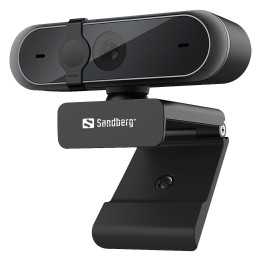
Kamera internetowa Avtek CAM4K została zaprojektowana z myślą o użytkownikach, którzy oczekują wysokiej jakości obrazu i dźwięku przy maksymalnej prostocie obsługi. Dzięki obsłudze rozdzielczości 4K, automatycznemu ustawianiu ostrości, szerokiemu kątowi widzenia oraz dwóm wbudowanym mikrofonom, zapewniona zostaje pełna gotowość do działania od razu po podłączeniu. Urządzenie sprawdzi się zarówno w środowisku biurowym, jak i domowym podczas spotkań online, webinarów, rozmów prywatnych czy zajęć zdalnych.
Najważniejsze cechy:
Obraz w 4K lub Full HD Umożliwia uzyskanie obrazu w jakości 4K przy 30 kl.s lub Full HD przy 60 kl.s w zależności od potrzeb. Zapewnia wyraźny, płynny i szczegółowy obraz w każdej sytuacji.
Autofokus i cyfrowe przybliżenie Dzięki autofokusowi ostrość ustawiana jest automatyczni. Dodatkowo dostępny jest 8krotny zoom cyfrowy (niedostępny w trybie 4K), który pozwala na przybliżenie wybranego fragmentu kadru bez konieczności zmiany ustawienia kamery.
Szeroki kąt widzenia 90 Konstrukcja optyczna pozwala objąć większy obszar, co sprawdza się zarówno podczas indywidualnych rozmów, jak i spotkań grupowych.
Dwa wbudowane mikrofony MEMS Zastosowanie dwóch mikrofonów wielokierunkowych zapewnia czysty dźwięk z zasięgiem do 3 metrów bez konieczności korzystania z dodatkowego sprzętu nagrywającego.
Łatwe podłączenie przez USBC Dzięki złączu USBC oraz dołączonemu kablowi USBC do USBA (1,7 m), kamera jest gotowa do pracy zaraz po podłączeniu. Nie są wymagane dodatkowe sterowniki ani zewnętrzne zasilanie.
Wbudowana zasłona i dioda LED Dla ochrony prywatności zastosowano fizyczną zasłonę obiektywu. Niebieska dioda LED informuje o aktywności kamery, dzięki czemu możliwe jest łatwe monitorowanie jej działania.
Uniwersalny montaż i gwint statywu Kamera wyposażona została w uchwyt z możliwością płynnego obrotu w poziomie oraz standardowy gwint 14", co umożliwia wygodne mocowanie na monitorze, statywie lub blacie biurka.
Kompatybilność z popularnymi systemami Kamera działa z systemami operacyjnymi Windows XPVista7810, Linux 2.6.24 i nowsze (w tym Ubuntu), macOS 10.6 i nowsze oraz Android 5.1 i wyżej. Wymagany jest jedynie port USBA oraz minimalna ilość dostępnych zasobów sprzętowych (ponad 200 MB wolnego miejsca na dysku i 32 MB pamięci RAM).

Szczegóły produktu
- Marka Avtek
- Kod produktu 684a38cfce70ca7471c988cc
- Dostępność 31 Przedmioty
- EAN13 5907731310772
- MPN 1TV383
Producent
Producent
VIDIS SA
ul. Logistyczna 4 55-040 Bielany Wrocławskie Polska
E-mail: handlowy@vidis.pl
Formularz kontaktowy: https://www.vidis.pl/kontakt
Telefon: +48 71 728 43 06
Bezpieczeństwo
Informacje o bezpieczeństwie
List of safety warnings for video conferencing sets and cameras based on the requirements of Regulation (EU) 2023/988 on General Product Safety (GPSR) 1. Risk of electric shock: * Make sure that the device is connected to a working socket with grounding. * Do not touch the plug or cable with wet hands. * Avoid using the device in places with high humidity. 2. Risk of overheating: * Provide adequate ventilation while maintaining at least 5 cm of free space around the device. * Do not block ventilation openings. 3. Fire risk: * Use only original chargers and accessories recommended by the manufacturer. * Do not leave the device on unattended near flammable materials. 4. Risk of bodily injury: * Avoid using the device in a position that causes excessive heat pressure on the skin to prevent burns. * Use the device on a stable surface to minimize the risk of falling. 5. Hazards in humid environments: * Do not use the unit outdoors in rain or in areas with high humidity, such as bathrooms. * If the device is flooded, immediately disconnect it from the power source and contact the service. 6. Hazards at high temperatures: * Do not expose the device to direct sunlight. * Avoid using the device at temperatures exceeding the recommended range (usually 5-35°C). 7. Risk of damage during cleaning: * Before cleaning, disconnect the device from the power supply and use a soft, slightly damp cloth. * Avoid using strong detergents that can damage the surface of the device. 8. Caution when replacing accessories: * Use only the accessories recommended by the manufacturer. * When replacing batteries, follow the manufacturer's instructions and do not expose the battery to high temperatures. 9. Risks associated with battery use: * Avoid damage to the battery by impact or puncture. * If the battery overheats or swells, stop using the device immediately. 10. Child Hazards: * Keep power cables out of reach of children. * Make sure that children do not play with the device or accessories that can be dangerous. 11. Risk of mechanical damage and injury: * The device's fall may cause the screen to shatter, which can lead to user cuts. * Use durable protective cases and tempered glass for your screen. If the screen is damaged, do not use the device until repaired. 12. Risk of electromagnetic interference * Using the device near medical devices such as pacemakers can cause electromagnetic interference. * Maintain a distance of at least 15 cm between the device and medical devices. 13. Effects on vision * Long-term use of the device, especially in dark conditions, can lead to eye strain. * Use eye protection mode if available, and take breaks from the screen regularly. 14. Regular maintenance * Failure to regularly clean ports and sockets can lead to damage or failure. * Clean ports and sockets regularly using a dry and clean cloth, avoiding moisture input. 15. Allergic reactions to materials * Materials used in the device housing (e.g. silicone, metal) can cause skin irritation or allergic reactions. * In case of redness or discomfort, remove the device and consult a dermatologist. Clean the case regularly to avoid accumulation of sweat or dirt.
Zestawy do wideokonferencji
Ostatnio oglądane
Produkty, które ostatnio zwróciły Twoją uwagę.