- Nowy
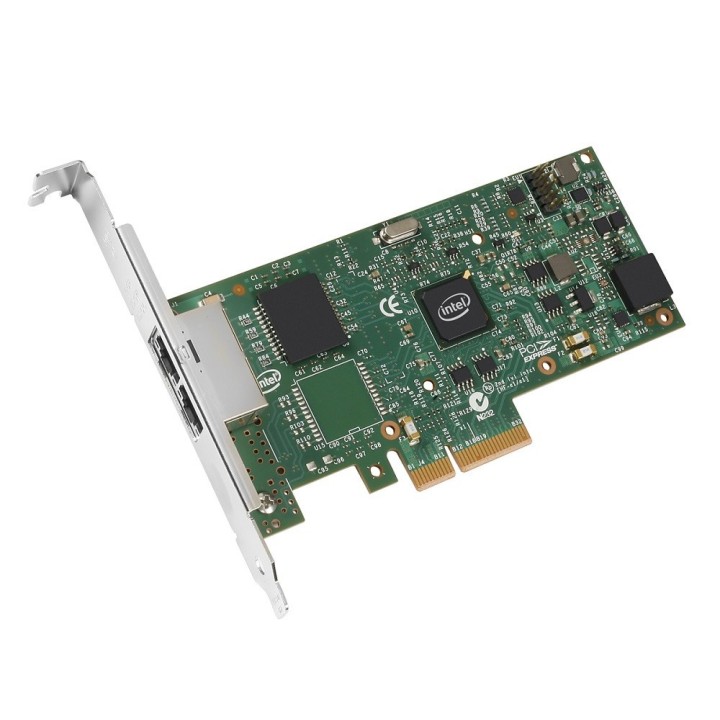
Dwuporcjowa karta sieciowa Fujitsu PLAN CP oparta na kontrolerze Intel I350‑AM2 zapewnia połączenie 10/100/1000 Mbps przez dwa złącza RJ‑45. Urządzenie korzysta z magistrali PCI Express 2.1 x4 (bus transfer 5 GT/s) i obsługuje tryby Full Duplex oraz Half Duplex, co pozwala na stabilną pracę w środowiskach serwerowych i aplikacjach wymagających przepustowości gigabitowej.
Karta oferuje rozbudowane mechanizmy wirtualizacji i akceleracji ruchu: Intel Virtualization for Connectivity, VMDq oraz sprzętową obsługę virtualizacji zgodną z PCI‑SIG z możliwością SR‑IOV do 8 Virtual Functions na port. Dodatkowo sprzęt wspiera funkcje sieciowe i offloady takie jak Auto MDI/MDIX, SFT, AFT, ALB oraz obsługę protokołów iSCSI i PXE 2.1, co upraszcza integrację w środowiskach wirtualnych i zdalnego rozruchu.
Urządzenie obsługuje ramki jumbo do 9,5 KB i posiada niskie zużycie energii (typ. 4,4 W, maks. 4,8 W). Karta jest dostępna w formacie Full Height z możliwością instalacji niskoprofilowego śledzia, pracuje w temperaturze 0–55 °C (magazynowanie -40–70 °C) i posiada diody sygnalizacyjne sygnalizujące połączenie/aktywność oraz prędkość transmisji. Boot ROM nie jest dostępny.
Fujitsu Technology Solutions Sp. z o.o.
ul. Krakowiaków 36 02-255 Warszawa Polska
E-mail: kontakt-pl@ts.fujitsu.com
Formularz kontaktowy: https://support.ts.fujitsu.com/
Telefon: +48 22 574 10 00
Fujitsu Technology Solutions Sp. z o.o.
ul. Krakowiaków 36 02-255 Warszawa Polska
E-mail: kontakt-pl@ts.fujitsu.com
Formularz kontaktowy: https://support.ts.fujitsu.com/
Telefon: +48 22 574 10 00
List of server component safety warnings based on the requirements of General Product Safety Regulation (EU) 2023/988 (GPSR) * Risk of electric shock: Make sure all components are properly grounded and disconnect the power supply before any maintenance or replacement. Avoid contact with wet hands when manipulating electrical components. * Overheating of components: Provide adequate ventilation in the server housing to prevent overheating of components. Monitor the temperature of components and respond to thermal alarms. Do not block ventilation openings. * Compatibility: Make sure the components are compatible with the server and other components. Improper compatibility can lead to damage and failure. * Mechanical Damage: Treat components with care, avoid dropping and bumps that can cause damage. * Electrostatics: When manipulating with components, use an antistatic band and work on an antistatic surface to avoid damage caused by electrostatic discharge (ESD). * Power Supply: Use power supplies of adequate power and quality to avoid overloading and damage to components. * Installation: Follow the manufacturer's instructions when installing the components. Incorrect installation can lead to damage and malfunction. * Sharp edges: Watch out for sharp edges of components and enclosures to avoid cuts. * Weight: Be careful when lifting heavy components and servers to avoid injuries. * Children and Animals: Keep components out of reach of children and pets to avoid swallowing small items or other dangerous situations. * Batteries: If the component contains a battery, make sure that it is properly installed and disposed of in accordance with local regulations. * Recycling: Recycle used components in accordance with applicable regulations.
Produkty, które ostatnio zwróciły Twoją uwagę.