- Nowy
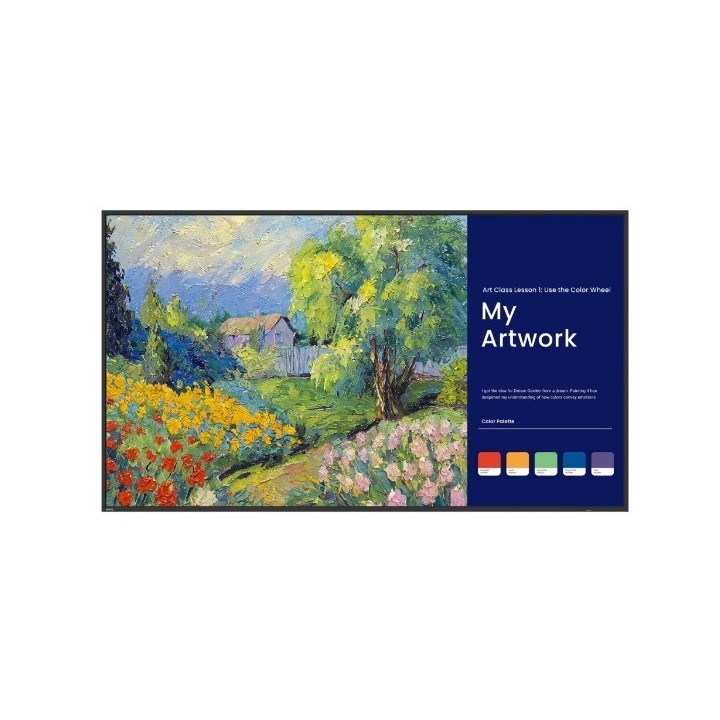
BenQ Deutschland SL6504 65" SL04 4K Digital Signage obrazki
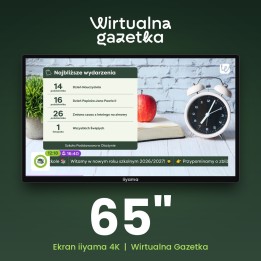
BenQ Deutschland SL6504 65" SL04 4K Digital Signage
Opis produktu
SL6504 to profesjonalny ekran Digital Signage o przekątnej 165,1 cm (65") zaprojektowany do zastosowań korporacyjnych i biurowych. Panel IPS z technologią LCD i podświetleniem LED oferuje rozdzielczość 3840 x 2160 (4K) przy jasności 500 cd/m², kontraście 1200:1 oraz współczynniku zamglenia 25%, co przekłada się na czytelny obraz i dobrą reprodukcję detali przy różnym oświetleniu. Czas reakcji wynoszący 8 ms i żywotność panelu oceniana na 50000 godzin zapewniają długotrwałą, stabilną eksploatację.
Urządzenie działa pod kontrolą systemu Android 13.0 i korzysta z wbudowanego procesora o architekturze ARM Cortex‑A53 + Cortex‑A73 z 8 rdzeniami. W pamięci dostępne jest 8 GB RAM oraz 64 GB pamięci wewnętrznej na treści i aplikacje. Bogate możliwości łączności obejmują dwa wejścia HDMI w wersji 2.0, dwa porty USB 2.0 oraz złącze Ethernet (RJ‑45), a także wbudowane głośniki o łącznej mocy RMS 24 W (2 x 12 W). Ekran wyposażono w ekran antyodblaskowy i tryby obniżające emisję niebieskiego światła, poprawiające komfort oglądania.
SL6504 został przygotowany do montażu ściennego (VESA 400 x 400 mm) i pracy w standardowych warunkach środowiskowych — temperatura eksploatacji 0–40 °C przy wilgotności względnej 10–80%. Typowe zużycie mocy w pracy to 110,3 W, a w trybie czuwania 0,5 W. Solidna konstrukcja i komplet interfejsów czynią model uniwersalnym rozwiązaniem do sal konferencyjnych, lobby i przestrzeni wspólnych.
Specyfikacja
- Model: SL6504
- Typ ekranu: IPS
- Technologia wyświetlacza: LCD
- Przekątna ekranu: 165.1 cm (65")
- Rozdzielczość: 3840 x 2160 px
- Typ HD: 4K Ultra HD
- Jasność: 500 cd/m²
- Kontrast (typowy): 1200:1
- Czas odpowiedzi (typowy): 8 ms
- Wskaźnik zamglenia: 25 %
- Podświetlenie: LED
- Pokrycie sRGB: 99% (CIE 1976)
- Żywotność panelu: 50000 h
- Aktywna powierzchnia - szerokość: 1428.5 mm
- Aktywna powierzchnia - wysokość: 803.5 mm
- Szerokość wyświetlacza: 1456.4 mm
- Wysokość wyświetlacza: 833.7 mm
- Głębokość wyświetlacza: 57 mm
- Waga wyświetlacza: 20.7 kg
- Interfejs montażu (VESA): 400 x 400 mm
- Porty HDMI (ilość): 2
- Wersja HDMI: 2.0
- Porty USB (ilość): 2
- Wersja USB: 2.0
- Gniazdo Ethernet (RJ-45): 1
- Prędkość transferu danych przez Ethernet LAN: 10,100 Mbit/s
- Wbudowane głośniki: Tak (2 x 12 W, łącznie 24 W RMS)
- System operacyjny: Android 13.0
- Architektura procesora: ARM Cortex-A53 + Cortex-A73
- Liczba rdzeni procesora: 8
- Pamięć RAM: 8 GB
- Pamięć wewnętrzna: 64 GB
- Pobór mocy (typowy): 110.3 W
- Pobór mocy (tryb czuwania): 0.5 W
- Napięcie wejściowe AC: 100 - 240 V
- Częstotliwość wejściowa AC: 50/60 Hz
- Temperatura pracy: 0 - 40 °C
- Wilgotność względna (eksploatacja): 10 - 80 %
- Kolor produktu: Czarny
- Ekran antyodblaskowy: Tak
- Dołączone przewody: HDMI, seryjny
- Certyfikat środowiskowy: ENERGY STAR
Szczegóły produktu
- Marka BenQ Deutschland
- Kod produktu 6825df25c36ec709f75470fd
- Dostępność 2 Przedmioty
- EAN13 4718755095665
- MPN 9HS3MTBDE2
Specyfikacja
- Przekątna ekranu (cal) 65 cal
- Rozdzielczość natywna 3840 × 2160
- Typ matrycy IPS
- Ekran dotykowy Nie
- Standard VESA 400 × 400
Bezpieczeństwo
Informacje o bezpieczeństwie
List of computer monitor safety warnings based on the requirements of General Product Safety Regulation (EU) 2023/988 (GPSR): * Risk to vision: Long-term gazing at the monitor screen may cause eye strain, dry eyes or headaches. * Limit the working time with the monitor. * Take regular breaks. * Maintain proper distance from the screen. * Ensure proper lighting in the room. * Set the brightness and contrast of the monitor to a comfortable level. * Ergonomics: Incorrect position when working with the monitor can lead to back, neck, and shoulder pain. * Set the monitor to the correct height so that the top edge of the screen is at eye level or slightly below. * Use an adjustable chair and desk to ensure an ergonomic position. * Maintain proper posture while sitting. * Risk of electric shock: Improper use or damage to the monitor can lead to electric shock. * Do not use the monitor in humid environments. * Do not touch the monitor with wet hands. * Do not put any items inside the monitor. * If the power cable is damaged, replace it with a new one. * Disconnect the monitor from power before cleaning. * Fire risk: Overheating or short circuiting in the monitor can cause a fire. * Do not cover the ventilation holes of the monitor. * Do not place the monitor near heat sources. * Use only the original power supply that came with your monitor. * If the monitor overheats, disconnect it from power immediately. * Mechanical damage: The fall of the monitor can cause damage and pose a threat to the user. * Set the monitor on a stable surface. * Secure cables to avoid accidental tripping. * For monitor transport, use appropriate protective packaging. * Cleaning: Improper cleaning of the monitor can damage the screen or cause other problems. * Use only a soft, dry cloth to clean the screen. * Do not use cleaning products containing alcohol, ammonia or other corrosive substances. * Disconnect the monitor from power before cleaning. * Disposal: Incorrect disposal of the monitor can pose a threat to the environment. * Return the used monitor to the e-waste collection point. * Do not throw the monitor in a regular trash can. * Children: The monitor is not a toy and should not be used by children without supervision. * Make sure children do not touch the power cables. * Make sure kids don't play around with the monitor packaging. * Repairs: Do not try to repair the monitor yourself. * Any repairs should be done by qualified personnel. * Monitor portability: Be careful when moving your monitor. * Disconnect all cables before moving. * Use appropriate packaging. * Weather conditions: Do not expose the monitor to extreme temperatures or moisture. * Protect your monitor from direct sunlight. * Adjustable settings: Do not use extreme brightness or contrast settings. * These can cause faster eye strain. * Noise: If the monitor makes disturbing noises, turn it off immediately. * Contact the technical service. * Environmental protection: Be sure to turn off the monitor when not in use. * You save energy this way. * Software: Use only the software provided by the manufacturer. * You will avoid compatibility issues.
Monitory
- Nowy
- Nowy
- Nowy
- Nowy

- Nowy
- Nowy
- Nowy
- Nowy
Ostatnio oglądane
Produkty, które ostatnio zwróciły Twoją uwagę.
- Nowy
- Nowy
- Nowy
- Nowy
- Nowy
- Nowy
- Nowy
- Nowy

- Nowy
- Nowy
- Nowy