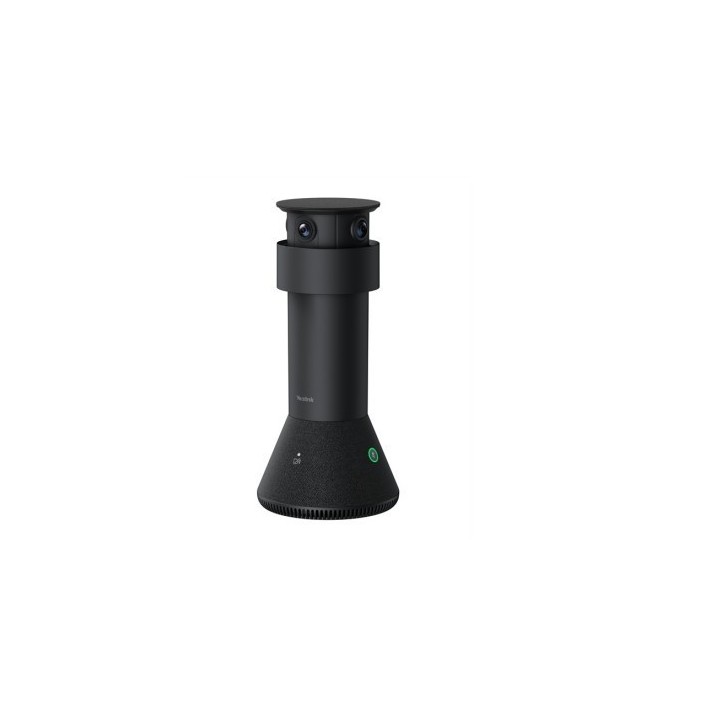
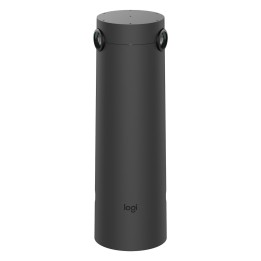
Yealink Kamera MTower
Opis produktu
Zawartość opakowania:
Kamera MTower
Uchwyt mocujący do stołu
Kabel sieciowy CAT5e (7,5 m)
Wymiary i waga:
Średnica: 142,5 mm
Wysokość: 303 mm
Waga: 1,23 kg
Kamera centralna (teleobiektyw):
Rozdzielczość: 8 MP
Sensor: Sony
Kąt widzenia: 93,5 (DFOV), 84,4 (HFOV), 53,1 (VFOV)
Automatyczna magnetyczna osłona prywatności
Kamery szerokokątne (2 szt.):
Rozdzielczość: 8 MP każda
Sensor: Sony
Kąt widzenia: 182 (DFOV), 151 (HFOV), 81 (VFOV)
Automatyczna magnetyczna osłona prywatności
Audio:
Wbudowane 61 mikrofonów (beamforming)
Technologia redukcji echa
Inteligentna redukcja szumów
Zasięg efektywnego zbierania głosu: do 6 m
Optymalna jakość dźwięku: do 3 m
Zasilanie:
Zasilanie przez hosta Yealink (SmartVision 40) z zasilaczem 48V 1.36A
W przypadku niższego prądu możliwość zasilania przez adapter PoE lub przełącznik PoE
Połączenia i przyciski:
1 przycisk wyciszenia kamery
2 przyciski wyciszenia mikrofonów
1 przycisk reset
1 port VCH (RJ45)
Wymagania:
Zestaw MCoreKit
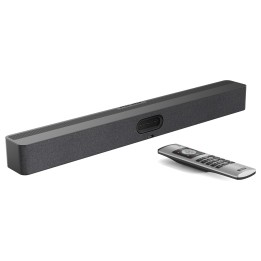
Smartvision 40
Pełna perspektywa i czysty dźwięk w każdej rozmowie
MTower to inteligentna kamera, zaprojektowana specjalnie z myślą o współpracy z wideobarem SmartVision 40 w systemie Microsoft Teams Rooms. Idealnie sprawdzi się w małych i średnich salach konferencyjnych, gdzie liczy się naturalna komunikacja i dobra widoczność wszystkich uczestników spotkania.
Dzięki trzem wbudowanym kamerom 4K (każda 8 MP), MTower potrafi uchwycić każdego uczestnika przy stole, zapewniając wyraźny obraz z wielu perspektyw. Technologia IntelliVision automatycznie wybiera najlepszy, czołowy kadr każdej osoby tak, jakby rozmówca siedział naprzeciwko.
Kamera jest też wyposażona w zestaw 61 mikrofonów z funkcją inteligentnego kierunkowego zbierania dźwięku. Głos jest zbierany z odległości nawet 6 metrów, dzięki czemu wszyscy uczestnicy są dobrze słyszani bez potrzeby podnoszenia głosu.
Na uwagę zasługuje również nowoczesny, cylindryczny design urządzenia oraz automatyczna magnetyczna osłona prywatności, która sama zasłania obiektywy, gdy kamera nie jest używana. Działa cicho, płynnie i bez mechanicznego zużycia prywatność bez kompromisów.
Montaż i zasilanie
MTower musi być używana w połączeniu ze SmartVision 40. Kamera nie wymaga osobnego zasilania, jeśli host korzysta z zasilacza o napięciu 48 V i natężeniu co najmniej 1,36 A. W przeciwnym razie konieczne będzie podłączenie MTower do dodatkowego adaptera PoE lub przełącznika PoE, który dostarczy odpowiednią moc.

Szczegóły produktu
- Marka Yealink
- Kod produktu 68391e59ce70ca74717e2f24
- Dostępność 13 Przedmioty
- EAN13 6938818320710
- MPN 1306173
Producent
Producent
Yealink (Europe) Network Technology B.V.
Keizersgracht 62 1015 CS Amsterdam Holandia
E-mail: europe@yealink.com
Formularz kontaktowy: https://www.yealink.com/en/contact
Telefon: +86 5925702000
Osoba odpowiedzialna w UE
Yealink (Europe) Network Technology B.V.
Keizersgracht 62 1015 CS Amsterdam Netherlands
E-mail: europe@yealink.com
Formularz kontaktowy: https://www.yealink.com/
Telefon: +86 5925702000
Bezpieczeństwo
Informacje o bezpieczeństwie
List of safety warnings for video conferencing sets and cameras based on the requirements of Regulation (EU) 2023/988 on General Product Safety (GPSR) 1. Risk of electric shock: * Make sure that the device is connected to a working socket with grounding. * Do not touch the plug or cable with wet hands. * Avoid using the device in places with high humidity. 2. Risk of overheating: * Provide adequate ventilation while maintaining at least 5 cm of free space around the device. * Do not block ventilation openings. 3. Fire risk: * Use only original chargers and accessories recommended by the manufacturer. * Do not leave the device on unattended near flammable materials. 4. Risk of bodily injury: * Avoid using the device in a position that causes excessive heat pressure on the skin to prevent burns. * Use the device on a stable surface to minimize the risk of falling. 5. Hazards in humid environments: * Do not use the unit outdoors in rain or in areas with high humidity, such as bathrooms. * If the device is flooded, immediately disconnect it from the power source and contact the service. 6. Hazards at high temperatures: * Do not expose the device to direct sunlight. * Avoid using the device at temperatures exceeding the recommended range (usually 5-35°C). 7. Risk of damage during cleaning: * Before cleaning, disconnect the device from the power supply and use a soft, slightly damp cloth. * Avoid using strong detergents that can damage the surface of the device. 8. Caution when replacing accessories: * Use only the accessories recommended by the manufacturer. * When replacing batteries, follow the manufacturer's instructions and do not expose the battery to high temperatures. 9. Risks associated with battery use: * Avoid damage to the battery by impact or puncture. * If the battery overheats or swells, stop using the device immediately. 10. Child Hazards: * Keep power cables out of reach of children. * Make sure that children do not play with the device or accessories that can be dangerous. 11. Risk of mechanical damage and injury: * The device's fall may cause the screen to shatter, which can lead to user cuts. * Use durable protective cases and tempered glass for your screen. If the screen is damaged, do not use the device until repaired. 12. Risk of electromagnetic interference * Using the device near medical devices such as pacemakers can cause electromagnetic interference. * Maintain a distance of at least 15 cm between the device and medical devices. 13. Effects on vision * Long-term use of the device, especially in dark conditions, can lead to eye strain. * Use eye protection mode if available, and take breaks from the screen regularly. 14. Regular maintenance * Failure to regularly clean ports and sockets can lead to damage or failure. * Clean ports and sockets regularly using a dry and clean cloth, avoiding moisture input. 15. Allergic reactions to materials * Materials used in the device housing (e.g. silicone, metal) can cause skin irritation or allergic reactions. * In case of redness or discomfort, remove the device and consult a dermatologist. Clean the case regularly to avoid accumulation of sweat or dirt.
Zestawy do wideokonferencji
Ostatnio oglądane
Produkty, które ostatnio zwróciły Twoją uwagę.